
Orthoface
ios-OrthofaceCapture App


Vision Os -OrthofaceVision App


Explore facial symmetry, ARKit mesh landmarks, phi guides, Marquardt-style masks, and 2D unwrap diagrams locally on supported TrueDepth devices.
Apple Vision Pro companion when configured, iPhone capture data can be paired with Apple Vision Pro using QR-based alignment for immersive visualization of active overlays
Orthoface is an educational facial measurement and visualization app. It uses the iPhone TrueDepth camera and ARKit face mesh to generate local 3D surface measurements, symmetry indicators, Marquardt-style overlay visualization, Golden Dodeca fitting, phi-ratio guides, curve/spline masks, 2D unwrap diagrams and optional export ZIP files.
Orthoface helps users visualize facial surface topology with vertex IDs, reference planes, colour-coded symmetry indicators and mathematical concordance scores
Orthoface uses the iPhone TrueDepth front camera and ARKit face tracking to generate a live 3D surface mesh of the face. The mesh is treated as a numbered topographic surface. In the current model, 1220 predefined vertex IDs are available: 587 mapped to one side, 587 mapped to the opposite side, and 46 midline vertices. The app compares symmetric pairs across the selected reference plane, computes distance differences, displays colour-coded points and lines, and exports reproducible measurement files
iOS to Apple Vision Pro workflow
The iPhone/ipad OrthofaceCapture App. captures and measures the face. Apple Vision Pro receives compact measurement packets after QR pairing. The QR marker provides a shared origin and axes, allowing active overlays to be placed in the immersive scene. If pairing fails, the iPhone remains functional and Vision Pro uses status/fallback visualization.
OrthofaceCapture is designed for learning, visualization, and experimental analysis of facial surface geometry. It is local-first, user-controlled, and does not include automatic upload to an external AI service.
Key Features
Live 3D Face Mesh Visualization
View a real-time wireframe mesh that follows the user’s facial surface using supported TrueDepth and ARKit face-tracking hardware.
Vertex ID Mapping
Display predefined facial mesh vertex IDs across the live surface. OrthofaceCapture supports a structured set of 1220 predefined vertex IDs, including paired left/right points and midline points.
Symmetry Indicators
Compare mapped left and right vertex pairs across the selected reference plane. The app displays color-coded symmetry indicators to help visualize local surface differences.
Vertex ID, Color Sphere, and Landmark Label Modes
Choose between numeric vertex ID overlays, ID plus color-sphere asymmetry markers, or anatomical landmark name labels near validated points.
Marquardt-Style Educational Visualization
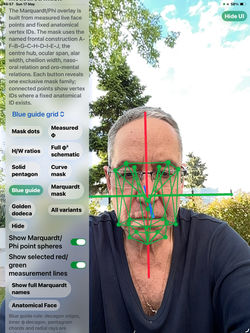
Explore Marquardt-style guide families, pentagon and radial guide relations, phi-based lines, measured ratios, and full mask visualizations.
True 12-edron and True 20-edron Fixed-ID Masks
Visualize fixed vertex-ID geometric masks linked to measured facial ratios. Color status indicates whether selected ratio relationships fall inside or outside the chosen target tolerance band.
Golden Dodeca Fit
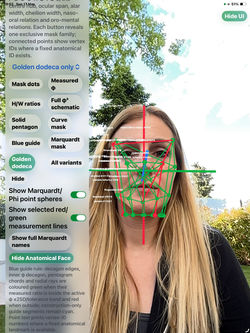
Use a 20-point golden-ratio reference scaffold to compare selected facial landmarks against an aligned educational reference structure. RMSE values show how closely measured landmarks fit the scaffold after alignment.
Phi-Ratio Guides
Display educational guide relationships such as height/width, ocular span/face, ocular/alar, cheilion/alar, naso-oral inverse phi, and oro-mental phi.
Curve and Spline Masks
View smoothed feature paths across the live mesh, including separate vertical and horizontal spline-ratio visualizations.
2D Unwrap Diagrams
Preview and export flattened educational diagrams for selected mask families, including connected lines, vertex ID numbers, and anatomical labels.
Optional Export ZIP Files
With user consent, OrthofaceCapture can create a single export package containing selected measurement files, reports, mesh previews, diagrams, and reference files. Export and sharing are always user initiated.
Apple Vision Pro Workflow Support
When configured, iPhone capture data can be paired with Apple Vision Pro using QR-based alignment for immersive visualization of active overlays. If pairing is not available, the iPhone app remains fully functional.
Privacy and Local-First Design
OrthofaceCapture is designed around local, user-controlled use. It does not provide GPT/OpenAI consultation, does not automatically upload facial data to an external AI service, and does not share exports unless the user chooses to do so.
Important Disclaimer
OrthofaceCapture is educational and experimental. It is not a medical device. It does not diagnose, treat, prescribe, screen for disease, prove attractiveness, recommend surgery, or replace review by a qualified professiona
 |  |  |  |
|---|---|---|---|
 |  |  |  |
 |  |  |  |
 |
Orthoface - vision os
Vision Os -OrthofaceVision App
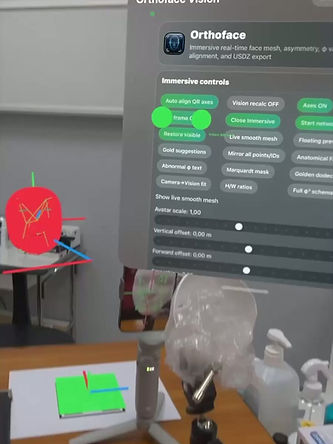
Orthoface Vision is the Apple Vision Pro companion for Orthoface. After QR pairing with iPhone, it receives compact local-network measurement packets and renders selected overlays in immersive space.
Orthoface Vision can show vertex IDs, planes, smooth mesh visualization, Marquardt-style mask families, Blue Guide, Golden Dodeca, phi-ratio lines, curve/spline masks and 2D unwrap previews.
Orthoface Vision is a visualization companion only. It does not diagnose, treat, prescribe, screen for disease or recommend surgery.


 |  |  |  |
|---|---|---|---|
 |  |
Summary metrics
1.Vertex ID and anatomical labels
The Vertex ID button shows numeric vertex IDs. The IDs + colour sphere mode shows the ID plus a small sphere whose colour follows asymmetry status. Anatomical Names mode shows fixed scientific landmark names near validated points. If only vertex ID mode is active, only numbers should be shown, not the full anatomical names.
2. Real Measurement of face asymmetries in all planes.
App take advantage of ios Phone’s/Ipad trueDepth front camera and take surface scans of subjects’ faces continuously. TrueDepth camera provides depth data in real time allowing stereo photogrammetry imaging. A wireframe texture of grid lines appears over user’s face matching the size, shape, topology of the user's face in real time.
Total of 1220 unique anthropometric topographical landmarks of face (ID number) points are automatically and continuously captured over face surface. 587 points left, 587 points right and 46 points in midline saggital plane face.The distances and differences of points to sagittal plane from right and to left side are calculated for each unique pair of anthropometric topographical landmarks of face. Mean difference of distances of anthropometric landmarks points toward one side right or left are depicted over face’s side with colour respectively, namely differences less than 1 mm in green colour (symmetric), between 1 to 2 mm in yellow colour and over 2 mm, points are depicted in red colour (asymmetric).
App offers dynamic measurements in real time of face symmetry. Coloured anthropometric topographical landmarks over 3D face’s wire frame give information continuously about the degree and the direction of asymmetry left or right respectively helping to identify easily the affected region of face quantitative assessment of face asymmetry allows to assess the severity of theside and region of asymmetry and place it within or outside the range of normative. Asymmetry index AI , face dominance left or right, average distances from the left side in mm (AvgL), average distances from the right side in mm (AvgR) and maximum distances difference from symmetric nodes of the two sides are being calculated (MaxDiff).
3. Marquardt-style mask and Blue Guide
The Marquardt-style mask displays pentagon and radial guide relations. The full mask button shows only the Marquardt mask family and removes unrelated overlays. Separate buttons expose names, vertex IDs, measured ratios, full phi3 schematic, solid pentagon, Golden Dodeca and curve/spline masks. The Blue Guide explains outer guide decagon, inner phi decagon, pentagram chords and radial rays. Lines turn green when inside the selected phi tolerance and red when outside it.
4. Golden Dodeca fit
Golden Dodeca uses a 20-point golden-ratio reference scaffold. Fixed anatomical landmarks and fallback automatic landmark selection can be fitted using Hungarian assignment, Umeyama similarity initialization and optional Levenberg-Marquardt refinement. RMSE reports how close the measured landmarks are to the reference scaffold after alignment.
5. Curve and spline masks
Curve/spline masks smooth feature paths across the live mesh. The app distinguishes vertical spline ratios from horizontal spline ratios. Because curve lengths can be affected by mesh noise and spline smoothing, the help recommends conservative interpretation and wider tolerance where appropriate.
6. 2D unwrap masks
The 2D unwrap section exports and previews flattened PNG/SVG/TXT diagrams for each mask family. Each image should show the active mask family only, with connected lines, vertex ID numbers and anatomical names placed without overlap. These diagrams are educational maps of what is measured, not clinical diagrams.
7. iOS to Apple Vision Pro workflow
The iPhone captures and measures the face. Apple Vision Pro receives compact measurement packets after QR pairing. The QR marker provides a shared origin and axes, allowing active overlays to be placed in the immersive scene. If pairing fails, the iPhone remains functional and Vision Pro uses status/fallback visualization.
8. Exports and consent
Export/share creates one ZIP package to reduce AirDrop/share delays. The ZIP can contain TXT, JSON, PLY, STL/OBJ/USDZ, SVG/PNG unwraps, mask-specific reports, corrected USDZ preview files, perfect reference files, Export is user initiated and should be disabled when consent is not granted.


Orthoface - iOS Apple Vision Pro QR ⇄ Connectivity Workflow
How the iPhone captures the face, calculates measurements, pairs with Vision Pro by QR/axes, and renders the measurements as immersive overlays over the subject.
1. Executive workflow summary
Orthoface uses a two-device architecture. The iPhone is the capture and measurement engine: it uses the front camera and ARKit/depth face mesh to detect facial vertices, apply the fixed anatomical vertex-ID map, compute symmetry, φ-ratio, Marquardt-style mask, Golden Dodeca, φ³, curve/spline, and PCA-plane measurements. Apple Vision Pro is the spatial viewer: it receives compact measurement packets over a local device-to-device connection and renders the selected points, lines, labels, planes, corrected/reference meshes, and masks in immersive space.
Why the QR alignment is needed: the QR marker gives both devices the same reference origin and XYZ axes. After that shared coordinate frame is established, the app can place the measurement overlays at the subject’s location rather than
floating away from the subject or appearing only as a flat fallback.

Download and print in 12cmx 12 cm


Plain explanation: OrthofaceCapture captures and calculates locally on iPhone/iPad. OrthofaceVision is the spatial viewer on Apple Vision Pro. The apps connect locally and securely; no developer server or third-party processing is part of the live workflow.


QR pairing and shared axes — step by step
1. Prepare: Open Orthoface on iPhone and Apple Vision Pro. Confirm camera, local network, and export consents. The iPhone may show the QR/axes control first in the capture panel.
2. Present marker: Place the QR/axes marker where the iPhone back camera and the Vision Pro can observe it. The marker should be flat, well lit, and not covered by the subject.
3. Match QR → front: Press Match QR → front. The iPhone uses the back camera to identify the QR marker. Vision Pro also observes the same marker from the viewer side.
4. Compute shared coordinate frame: Both devices assign the same origin to the marker and the same directional axes: red X, green Y, blue Z. The app stores the transform from iPhone capture coordinates to Vision Pro world coordinates.
5. Pairing confirmation: When transforms agree, pairing lamps turn green. If not, show yellow/red status and continue with fallback until the marker is reacquired.
6. Switch to live capture: The iPhone returns to front-camera face capture. It computes face mesh, anatomical points, masks, and measurements continuously.
7. Stream and render: The iPhone sends compact packets. Vision Pro rebuilds the active overlay family only, so the selected points, mask lines, IDs, and planes appear over the subject in immersive space.


Tutorial video about connectivity
Why OrthofaceVision is useful
It gives reviewers, educators, and clinicians a larger spatial view of the same local measurements captured on iPhone/iPad.
It keeps capture and visualization separated: the iPhone/iPad handles TrueDepth/ARKit capture while Apple Vision Pro provides hands-free immersive review.
QR alignment helps anchor the mesh and axes in physical space, making the measurement overlay easier to understand than a flat screen alone.
The local-only connection avoids cloud processing while still allowing a two-device spatial workflow.
It supports teaching and review of symmetry/asymmetry, vertex IDs, and educational facial proportion overlays without making diagnostic or treatment claims.
References and evidence.
R1. Nissen L, et al. Towards Preventing Gaps in Health Care Systems through Smartphone Use: Analysis of ARKit for Accurate Measurement of Facial Distances in Different Angles. Sensors. 2023;23(9):4486. Use: TrueDepth/ARKit measurement accuracy and limitations context.. URL/DOI: https://doi.org/10.3390/s23094486
R2. Zhu Y, Zhao Y, Wang Y. A Review of Three-Dimensional Facial Asymmetry Analysis Methods. Symmetry. 2022;14(7):1414. Use: 3D asymmetry methods: landmarks, original-mirror alignment, anthropometric masks and AI.. URL/DOI: https://doi.org/10.3390/sym14071414
R3. Gkantidis N, Opacic J, Kanavakis G, Katsaros C, Halazonetis D. Facial asymmetry and midsagittal plane definition in 3D: A bias-free, automated method. PLOS ONE. 2023;18(11):e0294528. Use: Midsagittal plane and automated asymmetry analysis background.. URL/DOI: https://doi.org/10.1371/journal.pone.0294528
R4. Taylor HO, et al. Quantitative facial asymmetry: using three-dimensional photogrammetry to measure baseline facial surface symmetry. J Craniofac Surg. 2014;25(1):124-128. Use: 3D photogrammetry and baseline facial surface symmetry context.. URL/DOI: https://doi.org/10.1097/SCS.0000000000000453
R5. Farkas LG. Anthropometry of the Head and Face. 2nd ed. New York: Raven Press; 1994. Use: Craniofacial anthropometric terminology and landmark nomenclature.. URL/DOI: ISBN 9780781701594
R6. Marquardt SR. Method and apparatus for analyzing facial configurations and components. US Patent 5,659,625. 1997. Use: Pentagon/radial mask overlay concepts and facial configuration analysis.. URL/DOI: https://patents.google.com/patent/US5659625A/en
R7. McDonnell R, McNamara A. Application of the Golden Ratio to 3D Facial Models. Trinity College Dublin. Use: 3D Golden Mask construction and mesh-based comparison concept.. URL/DOI: https://www.scss.tcd.ie/rachel.mcdonnell/papers/ApplicationOfGR.pdf
R8. Holland E. Marquardt’s Phi mask: pitfalls of relying on fashion models and the golden ratio to describe a beautiful face. Aesthetic Plast Surg. 2008;32(2):200-208. Use: Limitations of relying on a single golden-ratio mask as an ideal.. URL/DOI: https://doi.org/10.1007/s00266-007-9080-z
R9. Veerala G, et al. Marquardt’s Facial Golden Decagon Mask and Its Fitness with South Indian Facial Traits. J Clin Diagn Res. 2016;10(4):ZC49-ZC52. Use: Population-fit limitations of the golden decagon mask.. URL/DOI: https://doi.org/10.7860/JCDR/2016/16791.7593
R10. Zwahlen RA, Tang ATH, Leung WK, Tan SK. Does 3-dimensional facial attractiveness relate to golden ratio, neoclassical canons, ideal ratios and ideal angles? Maxillofac Plast Reconstr Surg. 2022;44:28. Use: Caution that only a few ideal parameters correlated with perceived 3D attractiveness in one studied population.. URL/DOI: https://doi.org/10.1186/s40902-022-00358-2
R11. Umeyama S. Least-squares estimation of transformation parameters between two point patterns. IEEE TPAMI. 1991;13(4):376-380. Use: Similarity initialization for Golden Dodeca fit.. URL/DOI: https://doi.org/10.1109/34.88573
R12. Kuhn HW. The Hungarian method for the assignment problem. Naval Research Logistics Quarterly. 1955;2:83-97. Use: One-to-one assignment step for template-landmark correspondence.. URL/DOI: https://doi.org/10.1002/nav.3800020109
R13. Marquardt DW. An algorithm for least-squares estimation of nonlinear parameters. SIAM J Appl Math. 1963;11(2):431-441. Use: Levenberg-Marquardt refinement of nonlinear least-squares residuals.. URL/DOI: https://doi.org/10.1137/0111030
Disclaimer.
Regarding its plausibility app offers no diagnosis or treatment. App provide an early indication that further evaluation may be warranted by Speciality Doctor. Algorithm in App detects in surface Irregularity between left and right site of the face. Explicitly is announced that the app is not for diagnosis. Clinical judgment and experience are required to properly use the software. App alone do not replace an M.D. or specialist. All information received from the App output must be reviewed before any attempted treatment. The software is not for primary image interpretation. Any influence to the operators in making decisions remains User own responsibility and experience. App does not dispense medical advice. Patient should seek a doctor’s advice in addition using this app and or before making any medical decisions for themself. Never substitute or replace doctors advice or change treatment modalities based on any measured outcome. App indicated for assisting healthcare professionals for scientific
Orthoface Privacy Policy
Effective date: 2026-05-16
Orthoface is an educational facial measurement and visualization app. It uses camera/ARKit/depth data to generate local 3D face mesh measurements, symmetry indicators, Marquardt-style overlay visualization, Golden Dodeca fit, φ-ratio calculations, 2D unwraps, perfect/corrected USDZ previews, and optional export ZIP files.
Orthoface is not a medical device. It does not diagnose, treat, prescribe, or recommend surgery. Beauty and φ scores are mathematical indicators only and include disclaimers.
Data processed locally
The app may process camera frames, ARKit face geometry, depth/mesh data, fixed anatomical vertex IDs, PCA planes, measurements, symmetry scores, ratio results, Marquardt/Golden Dodeca overlays, 2D unwrap previews, and export files. Processing is local by default.
Local network streaming
If the user pairs iPhone with Apple Vision Pro, Orthoface may stream face-mesh measurement packets over the local network for immersive visualization. This is controlled by the user and is intended for the user's own devices.
Exports
When the user presses export/share ZIP, Orthoface creates user-controlled files such as TXT, JSON, PLY, USDZ, USDA, OBJ, STL, SVG, PNG, 2D unwrap images, QR marker, and README. Exported face geometry and measurements can be sensitive. Share only with trusted recipients.
Local measurement workflow
Orthoface does not include an external relay. Measurement and visualization features are local by default unless the user chooses local-network streaming or export/share.
Product improvement
Do not collect product-improvement, analytics, or exported geometry from users unless you add a separate opt-in consent and update this policy before collection.
Orthoface processes camera, ARKit, depth, and local 3D mesh data to generate measurements and visual overlays. Data is processed locally by default. Users may export ZIP reports manually.
Orthoface is not a medical device and does not diagnose, treat, prescribe, or recommend surgery.Measurements may be affected by lighting, face pose, facial expression, TrueDepth availability, tracking quality, device motion, mesh quality and the selected reference plane. Users should not make medical decisions from the app output.
Contact and deletion requests
Contact: info@orthopractis.com.
Orthoface
ios-OrthofaceCapture App
Vision Os -OrthofaceVision App