
OrthoGait Dynamic Hub
OrthoGait App

OrthoGait Viewer App


 |  |  |  |
|---|---|---|---|
 |  |  |  |
 |  |  |  |
 |  |
OrthoGait App
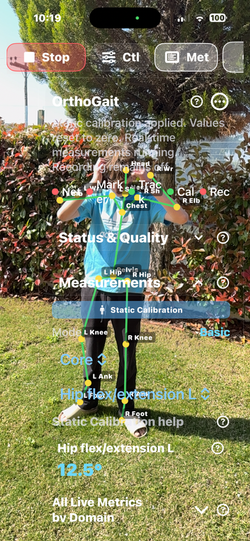
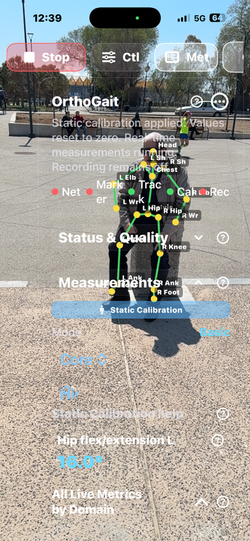
OrthoGaitApp helps capture, review, and export gait and posture sessions on iPhone or iPad.
Using camera-based movement capture, the app supports session setup, Static Calibration, live review, and user-triggered export in one workflow. OrthoGaitApp is designed for movement review, biomechanics, wellness, education, training, and research-oriented use.
A major strength of the app is its broad measurement library. OrthoGaitApp can present up to 91 numbered outputs, combining core lower-limb gait metrics with additional session and posture-related outputs when tracking quality allows. This gives users a richer view of movement patterns instead of relying on only a few basic values.
The core measurement set covers key lower-body domains such as:
* Pelvis metrics including tilt, obliquity, rotation, and trunk-related control
* Gait metrics such as cadence, step length, gait velocity, stance and swing symmetry, step width, and center-of-mass-related movement review
* Hip metrics including flexion/extension, abduction/adduction, rotation proxies, range of motion, and asymmetry trends
* Knee metrics including flexion, loading-response behavior, swing-clearance behavior, and side-to-side comparison
* Ankle metrics including dorsi/plantar motion and foot progression review
When measurable, the app can also show supplemental outputs related to exposure, composite scoring, spine alignment, trunk control, gravity alignment, session stability, and ergonomic trend review. These additional outputs are intended to expand understanding of posture and movement quality during a session.
Why these metrics matter:
* They help users review symmetry
* They help track range of motion
* They help observe timing and rhythm
* They help inspect balance-related movement behavior
* They help identify changes across sessions
* They support clearer review of walking and posture patterns for educational, wellness, training, and research workflows
OrthoGaitApp also includes:
* camera-based gait and posture capture
* Static Calibration to establish a stable session baseline before review
* live motion metrics across multiple domains
* optional supplemental ergonomic and spine-related outputs when measurable
* user-triggered export of session results
* in-app help covering workflow, connection, privacy, export, and measurement explanations
* no required account sign-in for the core workflow
For extended visualization, a paired workflow can optionally mirror the session to OrthoGaitViewer on Apple Vision Pro over the same local network. In this setup, the iPhone or iPad remains the capture source while the viewer can display mirrored joints, metrics, and session state in an immersive environment.
OrthoGaitApp is built for users who want more than simple step counting. It is designed to provide a broad movement-review environment that combines capture, calibration, live analysis, and export in a practical mobile workflow.
Important: OrthoGaitApp is intended for movement review, biomechanics, wellness, education, and research-oriented use. It is not intended to provide medical diagnosis or treatment decisions.
OrthoGaitVision App is a real-time motion analysis application designed to measure lower-limb biomechanics during walking and functional movement using the device camera and on-device pose estimation. The application provides continuous measurements of pelvis, hip, knee, ankle, and gait symmetry parameters and records them for later analysis and export.
The app is intended for movement analysis, physiotherapy monitoring, rehabilitation follow-up, sports assessment, and research in human biomechanics.
Measurements are displayed live with physical units, and values outside expected physiological ranges are highlighted for easier interpretation.
All measurements are recorded continuously and can be exported as a single file containing both summary metrics and time-series data.


How OrthoGait measures movement
1. Body detection — The mobile camera estimates body landmarks in real time while the subject performs the guided movement or walking task.
2. Skeleton building — Those landmarks are organized into a biomechanical skeleton so the app can follow segment orientation and joint relationships over time.
3. Metric calculation — The system derives joint angles, step timing, step length, cadence, symmetry measures, quality checks, and supplemental posture outputs when available.
4. Review and export — The live values are shown on the device, optionally mirrored to Apple Vision Pro, and can be placed into session summaries and exports.
Plain-language summary: OrthoGait combines body landmark tracking, segment orientation, event timing, and side-to-side comparison so the user can review walking pattern, posture, symmetry, and session quality together.
System modes
Basic
Devices: One iPhone or iPad
What is measured: Primary gait outputs from the local camera-based body stream, with additive ergonomic/spine supplements only when measurable.
Typical workflow: Calibrate → capture → review → export.
Hybrid
Devices: One iPhone/iPad + Apple Vision Pro
What is measured: The same primary outputs are mirrored to Apple Vision Pro, with shared-space alignment when the optional marker workflow is used.
Typical workflow: Connect → optional shared-marker alignment → review in window or immersive view.
Stereo 3D
Devices: Two iPhones/iPads + Apple Vision Pro
What is measured: Primary outputs plus corrected triangulated context on the viewer when dual-camera geometry is active.
Typical workflow: Connect both capture devices → align → triangulate → review.


OrthoGait Viewer App
Mirror OrthoGaitApp sessions on Apple Vision Pro with immersive skeleton visualization, live metric panels, and optional shared-marker room alignment.
OrthoGaitViewer is the native Apple Vision Pro companion app for OrthoGaitApp. It connects to a paired iPhone or iPad on the same local network and mirrors the incoming posture and metric stream for immersive spatial review.
The mobile device remains the capture source while OrthoGaitViewer presents received joints, live measurement panels, status flags, and immersive skeleton visualization in Apple Vision Pro. Users can connect and reconnect to the paired device, follow session state in real time, and open an immersive skeleton view when alignment is ready.
The paired workflow can mirror a broad movement review library with up to 91 numbered outputs across pelvis, gait, hip, knee, ankle, generated-output, and spine-and-gravity domains. This helps users inspect motion patterns, posture behavior, timing, symmetry, and session trends in a more intuitive spatial format.
Key features:
• Native Apple Vision Pro companion experience
• Live mirrored review of sessions captured in OrthoGaitApp
• Immersive skeleton visualization
• Paired metric review panels
• Optional shared-marker room alignment
• Local export of the recent viewer window after explicit user action
• In-app help for workflow, privacy, export, connection, and measurement explanations
Shared-marker alignment can be used when the same printed marker is recognized on both devices, helping align immersive content consistently in the room.
OrthoGaitViewer is designed for movement review, biomechanics, wellness, education, and research-oriented use. It requires the separate OrthoGaitApp companion app for live data and does not require account sign-in.
Important: OrthoGaitViewer is intended for movement review, visualization, education, and research-oriented use. It is not intended to provide diagnosis or treatment decisions.


OrthoGait uses a paired local workflow between the capture device and the spatial viewer. The iPhone or iPad runs the live motion capture session and sends only the required movement, posture, joint, and status data to Apple Vision Pro over the same local network or peer-to-peer connection for low-latency viewing. This lets the mobile device remain the acquisition source while the viewer presents the incoming skeleton, measurements, and session state in an immersive environment. The connection is designed for fast pairing, live updates, and re-connection when needed, so the user can continue reviewing movement without relying on external cloud processing for the real-time session
For spatial alignment, OrthoGait uses a shared QR-marker technique so both devices reference the same physical point in space. First, the iPhone or iPad detects automatically the printed QR marker once in view and calculates its transform in the local capture coordinate system. Apple Vision Pro then detects automatically the same marker in its own coordinate system. Once both devices have recognized the same marker, the app computes the relationship between those two transforms and updates the shared origin so the received skeleton and related visual content are placed consistently in the real room. This alignment step helps the spatial viewer present the motion data at the correct position, scale, and orientation relative to the user’s environment.
Spatial alignment with a shared QR-marker
shared markers do be dowloaded and printed 4x4 cm paper One of them is suffiecient.


3D triangulation, explained simply
In Stereo 3D mode, two aligned mobile cameras observe the same body landmarks from different viewpoints. The shared geometry allows the viewer to estimate a corrected 3D landmark position in space, improving spatial context compared with a single-view session.
Simple version:
1. Two cameras see the same landmark from two different angles.
2. The devices are aligned into the same reference space.
3. The viewer uses the combined geometry to estimate the landmark in 3D more robustly than with one camera alone.
Privacy and data flow
- Capture and live measurement estimation are designed to run on the mobile device.
- No account sign-in is required for the normal live workflow.
- When the paired workflow is enabled, Apple Vision Pro receives abstract pose and metric packets on the same local network.
- Images and video are not transmitted to the viewer during the normal live workflow.
- Users can deny Camera or Local Network permissions, avoid export or share actions, or disable the paired-device workflow at any time.
- Export files are created only when the user explicitly chooses export or share actions.


What is measured
The 91 outputs are grouped into 10 measurement domains.
Pelvis (4 outputs)
What this group covers: Pelvic position and trunk orientation during standing and walking.
How it is measured: Uses pelvis and trunk landmark orientation against the session reference frame to estimate tilt, obliquity, rotation, and frontal trunk lean.
Why it matters in review: Useful for understanding basic trunk and pelvic positioning during gait or standing review.
Outputs: Pelvis tilt, Pelvis obliquity, Pelvis rotation, Trunk lean
Gait (29 outputs)
What this group covers: Spatiotemporal walking metrics, rhythm, step structure, and estimated center-of-mass progression.
How it is measured: Uses detected gait events, timing windows, foot positions, and estimated center-of-mass progression to calculate rhythm, distance, symmetry, and movement-path outputs.
Why it matters in review: Useful for rhythm, step pattern, progression, symmetry, and walking performance review.
Outputs: Cadence, Step length L, Step length R, Step length mean, Stride length L, Stride length R, Stride length mean, Step time L, Step time R, Step time asymmetry, Stance time L, Stance time R, Swing time L, Swing time R, Stance/Swing asymmetry, Gait velocity, Stance symmetry, Swing symmetry, Step width, Center-of-mass estimation, COM path length, COM ML excursion, COM AP excursion, COM X, COM Y, COM Z, Toe-out / FPA L, Toe-out / FPA R, Toe-out asymmetry
Hip (12 outputs)
What this group covers: Hip motion in flexion-extension, abduction-adduction, rotational proxy, and stance-phase extension behavior.
How it is measured: Uses the relative orientation of pelvis, thigh, and foot segments to estimate hip flexion-extension, abduction-adduction, rotational proxy, and stance-phase extension behavior.
Why it matters in review: Useful for reviewing hip motion patterns and side-to-side differences across the gait cycle.
Outputs: Hip flex/extension L, Hip flex/extension R, Hip ab/adduction L, Hip ab/adduction R, Hip IR/ER proxy L, Hip IR/ER proxy R, Hip ROM total L, Hip ROM total R, Hip ROM asymmetry, Peak hip extension terminal stance L, Peak hip extension terminal stance R, Peak hip extension asymmetry
Knee (6 outputs)
What this group covers: Knee flexion pattern during stance loading and swing clearance.
How it is measured: Uses the angle formed by hip-knee-ankle landmarks and event-specific gait windows to estimate knee flexion and phase-specific loading or clearance values.
Why it matters in review: Useful for reviewing stance shock absorption and swing clearance patterns.
Outputs: Knee flexion L, Knee flexion R, Knee flex at loading response L, Knee flex at loading response R, Knee flex swing clearance L, Knee flex swing clearance R
Ankle (3 outputs)
What this group covers: Ankle dorsiflexion/plantarflexion behavior and side-to-side range symmetry.
How it is measured: Uses tibia and foot orientation in the sagittal plane to estimate dorsiflexion/plantarflexion and side-to-side range symmetry.
Why it matters in review: Useful for ankle motion pattern review and side-to-side balance.
Outputs: Ankle dorsi/plantar L, Ankle dorsi/plantar R, Ankle ROM asymmetry
Quality (12 outputs)
What this group covers: Recording-quality checks, protocol status, and high-level review flags.
How it is measured: Uses rule-based visibility, lighting, distance, speed, and step-quality checks to determine whether the capture is suitable for review and export.
Why it matters in review: Useful for deciding whether the recording conditions were good enough to trust the session.
Outputs: Trendelenburg proxy, Quality: rehab score, Quality: return-to-sport flag, Quality: notes, QC: body visible, QC: lighting, QC: distance, QC: steps length, QC: speed, QC: overall, Protocol: step index, Protocol: step title
Ergonomic (9 outputs)
What this group covers: Upper-body posture supplement when the subject and view allow those landmarks to be measured.
How it is measured: Uses head, neck, trunk, shoulder, elbow, hip, and knee landmark relationships as a supplemental posture layer when those landmarks are reliably measurable.
Why it matters in review: Useful as an upper-body supplement when the view supports those measurements.
Outputs: Head / Neck Alignment, Head Lateral Deviation, Trunk Inclination, Trunk Lateral Deviation, Shoulder Asymmetry, Shoulder Elevation / Abduction, Elbow Flexion, Hip Flexion, Knee Flexion
Exposure & Composite Scores (8 outputs)
What this group covers: Session behavior, supplement confidence, posture-change frequency, and composite ergonomic estimates.
How it is measured: Uses session timing, posture-change events, confidence weighting, and normalized penalties to estimate ergonomic behavior and composite posture quality.
Why it matters in review: Useful for summarizing posture-change behavior and confidence-weighted ergonomic context.
Outputs: Static Posture Duration, Break Adherence, Alignment Confidence, Ergonomic Index, Index coverage, Normalized Ergonomic Index, Automated RULA Estimate, Automated REBA Estimate
Generated Output (2 outputs)
What this group covers: Narrative summary and exported time-window context.
How it is measured: Generated from the active measurement window to produce the narrative session summary and export context labels.
Why it matters in review: Useful for summaries, exports, and session documentation.
Outputs: Clinical Summary, Export Window
Spine & Gravity (6 outputs)
What this group covers: Spinal alignment supplement and gravity/verticality relationship.
How it is measured: Uses trunk geometry and its deviation from vertical to describe spine alignment, side bending, stability, and gravity-related posture balance.
Why it matters in review: Useful for describing upright control, trunk deviation, and stability relative to vertical.
Outputs: Spine Alignment, Spine Lateral Deviation, Spine Stability, Gravity Alignment, Gravity Balance, Spine–Gravity Index
Reference
-
1Kadaba MP, Ramakrishnan HK, Wootten ME. Measurement of lower extremity kinematics during level walking. J Orthop Res. 1990;8(3):383-392. PMID: 2324857.https://pubmed.ncbi.nlm.nih.gov/2324857/
-
2Hollman JH, McDade EM, Petersen RC. Normative spatiotemporal gait parameters in older adults. Gait Posture. 2011. PMID: 21531139. PMCID: PMC3104090.https://pubmed.ncbi.nlm.nih.gov/21531139/
-
3Lau LK, et al. Reference Values of Gait Speed and Gait Spatiotemporal Parameters for a South East Asian Population: The Yishun Study. Clin Interv Aging. 2020. PMID: 33061327. PMCID: PMC7522423.https://pubmed.ncbi.nlm.nih.gov/33061327/
-
4Kwon JW, Son SM, Lee NK. Changes of kinematic parameters of lower extremities with gait speed: a 3D motion analysis study. J Phys Ther Sci. 2015;27(2):477-479. PMID: 25729195. PMCID: PMC4339165.https://pubmed.ncbi.nlm.nih.gov/25729195/
-
5Rowe E, et al. Age and sex differences in normative gait patterns. Gait Posture. 2021. PMID: 34023654.https://pubmed.ncbi.nlm.nih.gov/34023654/
-
6Liang S, et al. The reliability and validity of gait analysis system using 3D markerless pose estimation algorithms. Front Bioeng Biotechnol. 2022. PMID: 36032709. PMCID: PMC9399401.https://pubmed.ncbi.nlm.nih.gov/36032709/
-
7Mazurek KA, et al. A validation study demonstrating portable motion capture cameras accurately characterize gait metrics when compared to a pressure-sensitive walkway. Sci Rep. 2024. PMID: 39075097. PMCID: PMC11286855.https://pubmed.ncbi.nlm.nih.gov/39075097/
-
8Rössler R, et al. Spatiotemporal gait characteristics across the adult lifespan: Reference values from a healthy population – Analysis of the COmPLETE cohort study. Gait Posture. 2024. PMID: 38290395.https://pubmed.ncbi.nlm.nih.gov/38290395/
-
9Pirker W, Katzenschlager R. Gait disorders in adults and the elderly: A clinical guide. Wien Klin Wochenschr. 2017;129(3-4):81-95. PMCID: PMC5318488.https://pmc.ncbi.nlm.nih.gov/articles/PMC5318488/
-
10World Health Organization. Musculoskeletal health / musculoskeletal conditions. 2022.https://www.who.int/news-room/fact-sheets/detail/musculoskeletal-conditions
-
11CDC / NIOSH. Ergonomics and Work-Related Musculoskeletal Disorders. Updated 2024.https://www.cdc.gov/niosh/ergonomics/index.html
-
12OSHA. Computer Workstations eTool and Monitor Guidance.https://www.osha.gov/etools/computer-workstations
-
13Stincel OR, et al. Assessment of Forward Head Posture and Ergonomics in Young IT Professionals. 2023. PMID: 36790407.https://pubmed.ncbi.nlm.nih.gov/36790407/
-
14Choi KH, et al. A Comparison Study of Posture and Fatigue of Neck According to Monitor Type. 2020. PMID: 32878184.https://pubmed.ncbi.nlm.nih.gov/32878184/
-
15Intaruk R, et al. Differences in Posture, Neck Angle, and Body Discomfort During Sustained Digital Device Use. 2025. PMID: 41007562.https://pubmed.ncbi.nlm.nih.gov/41007562/
FAQ
Do I need Apple Vision Pro to use OrthoGait?
No. Basic mode works with one iPhone or iPad.
What is the difference between Hybrid and Stereo 3D?
Hybrid mirrors the single-device mobile session to Apple Vision Pro. Stereo 3D adds a second mobile camera for corrected triangulated context.
Are all 91 outputs visible in every session?
No. The primary gait outputs are the core set. Ergonomic, spine, and gravity outputs appear only when measurable.
Does the viewer receive live video from the phone?
In the normal live workflow, the paired viewer receives abstract pose and metric packets rather than the camera image stream.
Is the shared marker always required?
No. It is optional and used when shared-space alignment is needed.
SupportOrthopractis
Email: info@orthopractis.com.
OrthoGait turns gait analysis from a lab event into a usable workflow.
Capture movement with the devices people already have, transform sessions into structured visual outputs and quantitative metrics, and review change over time in the clinic, in rehabilitation, in training, and in research. Built for speed, repeatability, and clarity, OrthoGait makes movement analysis more available where decisions are actually made. This value proposition is aligned with the current literature on markerless and smartphone-based motion capture: lower-cost video-based systems are attractive because they reduce dependence on specialized laboratories and can broaden access to biomechanical assessment.
Why it matters
Traditional 3D gait laboratories remain the reference standard for many kinematic measurements, but they are not easy to deploy widely. Marker-based systems require reflective markers, repeated setup for every subject, trained staff, dedicated lab space, and substantial time; markers can also influence the naturalness of movement and are vulnerable to soft-tissue artifact. That is exactly why markerless and smartphone-based systems matter: they reduce friction around capture and create a path toward more frequent, real-world motion assessment.
That honesty actually strengthens the product story, because it positions OrthoGait as the tool that expands access and frequency of gait analysis rather than pretending every workflow needs a full lab every time.