
PlaceEasy
ios and Vision


PlaceEasy is a spatial placement tool for people who work with 3D information and need to explain it clearly. It allows users to import their own USDZ, USD, USDA, USDC, and Reality files, then place those files in iOS AR or visionOS immersive space using a clear cube-and-sphere rig. The app is designed around a simple idea: every model needs a position and a direction. Cube A marks where the object is. Sphere B marks which way it faces. The file follows that relationship.
This makes PlaceEasy useful across science, construction, engineering, technical training, education, medicine teaching, product design, and research communication. A civil engineer can use it to discuss the approximate location and orientation of a site component. A construction team can use it to explain an equipment placement or installation direction. A teacher can use it to demonstrate an anatomical model, mechanical part, scientific object, or technical assembly. A researcher can use it to present a prototype or lab setup. A product designer can use it to show a model in a real environment. A technical trainer can use it to make the difference between position and direction visible.
PlaceEasy keeps physical scale by default, so imported files remain meaningful when scale matters. Auto-fit is available only when the active file needs to be made easier to see. Each file keeps its own settings, so editing one object does not automatically resize or rotate neighboring objects. This is important when comparing multiple imported files or demonstrating several components in the same space.
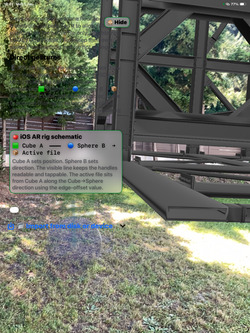
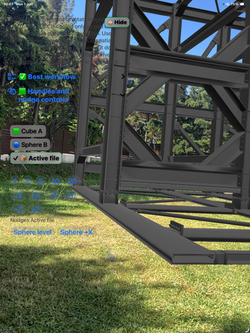
On iOS, PlaceEasy uses a transparent AR overlay and touch gestures. Users can tap, drag, pinch, rotate, double tap, and long press to work with the active rig. The iOS AR view shows Cube A, Sphere B, a connector line, and the loaded file so the rig remains readable and workable.
On visionOS, PlaceEasy keeps controls in the normal window and keeps immersive space clean. The immersive scene contains only RealityKit content: imported files and their rig elements. Window-safe mode helps keep the normal window reliably touchable, and Gestures On can be enabled when direct immersive manipulation is needed.
PlaceEasy is local and file-first. It does not require an account. The current build does not include advertising, analytics, tracking, cloud sync, server uploads, subscriptions, or third-party SDKs. Imported files are copied into local app storage so they can be shown and managed by the app.
PlaceEasy is not a certified measuring instrument, construction approval system, engineering validation system, medical device, diagnostic tool, or safety-critical system. Its value is in visualization, explanation, teaching, spatial review, early discussion, and communication. It helps people see what they are talking about.


 |  |  |  |
|---|---|---|---|
 |  |  |  |
 |  |  |  |
 |  |  |
PlaceEasy
Bring your own 3D files into real space.
PlaceEasy is a local iOS AR and visionOS spatial placement tool for USDZ, USD, USDA, USDC, and Reality files. Import files from disk/device storage, keep physical scale by default, and position each file with a clear cube-and-sphere rig.
🟩 Cube A sets position.
🔵 Sphere B sets direction.
📦 Your file follows the Cube-to-Sphere relationship.
Why it is useful
PlaceEasy helps teams explain 3D placement visually instead of only using screenshots, drawings, or freehand model rotation. It is useful for early design discussion, construction coordination, client walkthroughs, equipment layout, education, product demonstration, and spatial review.
PlaceEasy is useful wherever a 3D object must be understood in space. In civil engineering and construction, it can support early visual discussion of component placement, equipment orientation, access sides, installation intent, and technical-room layouts. In technical rigs, research labs, robotics, manufacturing, and training spaces, it can help explain where a device, sensor, fixture, or part belongs and which way it should face. In medicine and anatomy teaching, it can help educators show bones, organs, joints, instruments, or generic teaching models spatially, while remaining outside diagnosis, treatment, surgical navigation, or regulated medical use. In science education, it can make abstract models easier to see, discuss, and remember. In architecture, product design, museums, interiors, and public communication, it can make spatial ideas easier for non-specialists to understand.
The simple rig is the key: 🟩 Cube A sets position, 🔵 Sphere B sets direction, and 📦 the imported file follows that relationship. This makes PlaceEasy a practical communication layer for many sectors of science and technical work, while professional measurement, approval, safety, and medical decisions remain with approved methods and qualified experts.
Construction examples
-
Preview an equipment model in a plant room before installation.
-
Show where a duct, pipe, opening, bracket, or fixture should face.
-
Communicate an installation sequence to a client or field team.
-
Compare a design component against the actual space before a meeting.
-
Teach orientation, clearance, and access requirements with a visible rig.
-
PlaceEasy is not a certified measuring instrument, construction approval system, safety compliance tool, or substitute for professional engineering verification.
Other possible uses
Furniture and interior layout
Product mockups and trade-show preparation
Classroom 3D demonstrations
Museum and exhibit planning
Manufacturing fixture visualization
Real estate and staging concepts
Architecture and design review
Anatomy, training, and educational 3D review when not used for diagnosis or treatment
Supported file types
Visible RealityKit formats:
USDZ
USD
USDA
USDC
Reality
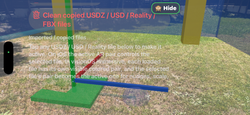
FBX files can be copied as conversion/reference files only. Convert FBX to USDZ, USD, or Reality before expecting visible content.
Quik review tips for quik safe usage
Use 🟩 Cube A to position the file.
Use 🔵 Sphere B to aim the file
Use 🤏 pinch to scale the active file only.
Use 🔄 rotate to orbit Sphere B around Cube A and adjust direction.
Tap 🙈 Hide to clear the camera view, then ✨ Show AR controls to reveal controls again.
Quick start — visionOS
Open PlaceEasy.
Import one or more supported spatial files from the normal window.
Tap Open Immersive Space.
Window-safe mode turns on so the normal window remains touchable.
Turn Gestures On only when you want to directly manipulate immersive objects.
Use Force Window-safe now to return to reliable window interaction.
Use the Y-axis vertical button to keep the active file upright.
Confirm the file is USDZ, USD, USDA, USDC, or Reality.
Confirm the file opens in another compatible 3D viewer.
Use Reset handles or Bring in front.
Leave Auto-fit off when you want authored physical scale.
Enable Auto-fit only for the active file if a model’s scale or origin makes it hard to locate.
For very large files, wait for the import copy to finish.
Construction and professional use warning
PlaceEasy is for visualization and placement review. Do not rely on it as the only source for measurements, construction approval, code compliance, safety decisions, structural validation, medical decisions, or legal decisions. Always verify with approved drawings, instruments, professional review, and site procedures.
Privacy Policy page
Terms of Use
© 2026 Orthopractis. PlaceEasy is a local spatial placement tool. Support: info@orthopractis.com

dowload sample file to test
PlaceEasy is a local file-first AR/spatial placement tool for user-selected USDZ, USD, USDA, USDC, and Reality files. Every time the app or app window is loaded, the app shows a Privacy Policy and Terms of Use consent page before the normal iOS AR or visionOS UI opens. Tap Yes — agree and open PlaceEasy to continue. No login or account is required. There are no subscriptions, in-app purchases, ads, analytics, tracking, cloud sync, or server-side processing in this build.
Supported visible formats are USDZ, USD, USDA, USDC, and Reality. FBX files may be copied for conversion/reference tracking only and are not rendered directly by RealityKit in this build.
Reviewers can test import with any small USDZ, USD, USDA, USDC, or Reality file saved to Files. Orthopractis support and any optional sample/download instructions are available here:
https://www.orthopractis.com/PlaceEasy
If testing on iOS:
1. Download or save a USDZ file to Files.
2. Launch PlaceEasy.
3. On the consent page, tap Yes — agree and open PlaceEasy. The consent page appears again on the next launch.
4. Tap the import button and choose the USDZ/USD/Reality file.
5. Allow camera permission for AR.
6. Use the transparent AR controls.
7. Tap 🟩 Cube A, 🔵 Sphere B, the connector, or the file to select the rig.
8. Drag Cube A to position, drag Sphere B to aim, pinch to scale only the active file, rotate to adjust direction, and use the Y-axis vertical button to keep the active file upright.
9. Use Hide/Show AR controls to confirm the overlay can be hidden and restored.
If testing on visionOS:
1. Launch PlaceEasy.
2. On the consent page, tap Yes — agree and open PlaceEasy. The consent page appears again on the next launch.
3. Use the normal window to import or select a USDZ/USD/Reality file.
4. Tap Open Immersive Space.
5. The Immersive button turns green only while immersive space is open.
6. The immersive scene stays clean: no HUD, no file picker, no help panel, and no ornaments. Only the imported file and cube/sphere rig content appear in immersive space.
7. Window-safe mode is forced when immersive opens, so the normal window remains reliably touchable. Tap Gestures On only to test direct immersive object interaction, then use Force Window-safe now to return to safe window control.
8. Use the Y-axis vertical button to keep the active file upright.
Privacy behavior:
Imported files remain local in the app container.
iOS camera frames are used locally by ARKit/RealityKit for AR placement.
The app does not upload files, camera frames, room data, or placement data.
more
Privacy Policy URL: https://www.orthopractis.com/privacy
Terms of Use URL: https://www.orthopractis.com/terms-of-use
Contact: info@orthopractis.com
Known scope limitation:
PlaceEasy is a visualization and placement tool. It is not a measurement-certification, safety-critical engineering, construction approval, regulated medical, or diagnostic tool.