
Ergonomic App
The Ergonomic applications provides a real-time, accessible method for posture assessment using computer vision. It extends traditional ergonomic evaluation methods by introducing continuous measurement and user-friendly feedback, while remaining within the scope of non-medical wellness applications.


Real-time posture analysis using camera-based skeletal tracking to support ergonomic awareness during daily sitting activities.
Introduction
Poor posture during office work and prolonged workstation use is strongly associated with the development of musculoskeletal disorders (MSDs), which represent a leading cause of disability worldwide [1]. Sustained sitting, especially with forward head posture, rounded shoulders, and inadequate lumbar support, increases mechanical load on the cervical and lumbar spine, contributing to neck pain, low back pain, and intervertebral disc stress [2–4].

Forward head posture, commonly observed during computer use, significantly elevates cervical spine loading and muscular demand, leading to fatigue and chronic pain syndromes [5]. Similarly, prolonged static sitting has been shown to increase intradiscal pressure in the lumbar spine, accelerating degenerative changes and contributing to chronic low back conditions [6].
Upper limb positioning also plays a critical role. Poor desk ergonomics, such as improper keyboard height or unsupported forearms, are associated with shoulder overload, trapezius muscle strain, and increased risk of repetitive strain injuries [7,8]. In addition, asymmetrical posture and sustained muscle activation patterns can lead to imbalance, discomfort, and reduced functional capacity over time [9].
Beyond musculoskeletal effects, prolonged sedentary behavior is linked to reduced circulation, fatigue, and decreased overall physical performance [10]. The cumulative impact of these factors highlights the importance of maintaining neutral alignment, regular movement, and ergonomic workstation design.
Accessible, real-time posture awareness tools may support early behavioral correction and help reduce the long-term burden of posture-related conditions.
⸻
References
[1] World Health Organization. Musculoskeletal conditions.
[2] National Institutes of Health. Low back pain and occupational risk factors.
[3] Waersted M et al. Computer work and musculoskeletal disorders.
[4] Hartvigsen J et al. What low back pain is and why we need to pay attention.
[5] Hansraj KK. Assessment of stresses in the cervical spine caused by posture.
[6] Nachemson A. Lumbar intradiscal pressure studies.
[7] Szeto GPY et al. A field comparison of neck and shoulder posture.
[8] Cagnie B et al. Individual and work related risk factors for neck pain.
[9] Falla D et al. Muscle dysfunction in neck pain.
[10] Dunstan DW et al. Too much sitting and cardiometabolic risk.
Desription
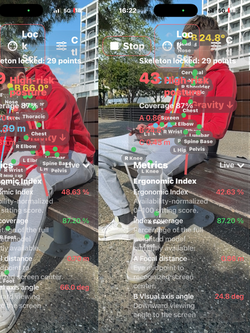
Ergonomic Real 3D is a multi-device posture analysis system that combines iPhone or iPad capture with Apple Vision Pro spatial visualization to reconstruct and evaluate human posture in real time within a shared three-dimensional environment. The system estimates anatomical landmarks as metric 3D points using camera-based skeletal tracking, and when both devices detect a common printed QR alignment marker, a shared world coordinate system is established with real-world scale and orientation. In this QR-aligned mode, posture is represented in true spatial coordinates, and when both devices observe the same anatomical landmark, its position can be refined using geometric stereo triangulation by minimizing the distance between observation rays from each device. This enables consistent spatial positioning and improves the reliability of measurements compared to single-view estimation, while transparently indicating confidence when full triangulation is not available.
Within this unified spatial framework, the system continuously computes biomechanical parameters including trunk inclination relative to gravity, head and neck alignment relative to the trunk, shoulder symmetry and elevation, joint angles of the upper and lower limbs, and the spatial relationship between the user and their workstation. Environmental interaction is quantified through measurements such as eye-to-screen distance and viewing angle, expressed in real-world units when QR alignment is active. In parallel, the system evaluates temporal exposure by tracking static posture duration, movement variability, and break adherence, reflecting the importance of posture variation emphasized in international ergonomic guidelines. All measurements are compared to established ergonomic target zones derived from WHO, CDC, NIH, OSHA, and EU-OSHA guidance, and values outside these ranges are highlighted with short explanatory interpretations to support intuitive understanding.
These individual metrics are integrated into a composite 3D Ergonomic Index, a continuous score representing overall posture quality based on weighted deviations from neutral alignment, confidence of measurement, and exposure over time. The system also provides automated approximations of established observational methods such as RULA and REBA by mapping measured joint angles and posture characteristics to their respective scoring frameworks, offering additional context for ergonomic risk without replacing professional assessment. All outputs are visualized in real time within the spatial interface as a dynamic 3D skeletal model combined with metric panels, allowing users to observe posture behavior directly in space and understand how alignment changes during normal activity. Data can be exported, including numerical values, normal ranges, and concise interpretations, enabling further analysis or sharing across devices.
Ergonomic Real 3D is designed as an accessible, markerless system for posture awareness, ergonomic optimization, and research support. It does not measure internal forces or provide medical diagnosis, but instead translates established ergonomic principles into continuous, real-time spatial metrics that reflect how the human body interacts with its working environment. By combining computer vision, shared-space alignment, and quantitative biomechanical analysis, the system extends traditional ergonomic assessment from static observation to dynamic, user-centered spatial understanding.
Ergonomic App is a markerless, real-time ergonomic assessment system that translates established observational frameworks such as RULA and REBA into continuous biomechanical measurements using computer vision.
The system extends traditional ergonomic assessment methodologies by integrating continuous kinematic data, enabling dynamic evaluation of posture rather than static classification. This approach aligns with emerging trends in digital health and objective biomechanical monitoring.
Unlike traditional methods, which rely on static observational scoring, the system provides:
• quantitative joint angle analysis
• continuous monitoring over time
• real-time feedback
This enables improved detection of sustained postural deviations associated with musculoskeletal risk

 |  |  |  |
|---|---|---|---|
 |  |  |  |
 |  |
Overview
Ergonomic is a camera-based application that provides real-time posture and ergonomic assessment during seated activities. The system uses on-device computer vision to estimate body alignment and generate simplified metrics related to posture.
The application is intended for educational and wellness purposes and does not provide medical diagnosis or treatment.
⸻
System Functionality
The application uses the device camera to perform markerless skeletal tracking. A simplified human body model is estimated in real time, including head, neck, shoulders, and pelvis.
From these tracked points, the system calculates geometric relationships that represent posture and alignment.
All processing is performed locally on the device. No images, videos, or personal data are stored or transmitted.
⸻
Measured Parameters
The system estimates posture using the following derived parameters.
Trunk orientation is calculated using the vector between pelvis and neck, representing alignment relative to the vertical axis.
Head position is evaluated relative to the neck to estimate forward displacement.
Shoulder symmetry is assessed by comparing vertical alignment between left and right shoulders.
Spinal alignment is approximated as the angular deviation of the trunk from vertical.
These parameters are geometric estimations and do not represent direct biomechanical measurements.
⸻
Ergonomic Index
The application computes a simplified ergonomic index that combines multiple posture-related parameters into a single score.
The index reflects deviation from a neutral upright posture. Higher values indicate closer alignment to neutral posture, while lower values indicate greater deviation.
The score is intended for relative comparison during use and not as a clinical metric.
⸻
Interpretation
Neutral posture is defined as an upright trunk, minimal forward head displacement, and symmetrical shoulder positioning.
Deviations from these conditions may be associated with increased mechanical load on the musculoskeletal system during prolonged sitting.
The application provides real-time feedback to support user awareness of posture.
⸻
Limitations
The system relies on camera-based estimation and may be affected by lighting conditions, camera position, clothing, and partial occlusion.
Measurements are approximate and based on external body geometry. Internal forces, joint loads, and clinical conditions are not measured.
⸻
Privacy and Data Use
All processing is performed on-device.
No images, videos, or biometric identifiers are stored or transmitted.
Camera input is used exclusively for real-time posture estimation.
⸻
Intended Use
This application is intended for general wellness, posture awareness, and educational purposes.
It is not intended for medical diagnosis, treatment, or clinical decision-making.
Users should consult qualified healthcare professionals for medical concerns.
Ergonomic is a camera-based digital ergonomics platform that turns everyday Apple devices into real-time posture assessment tools. It provides immediate ergonomic feedback on seated work posture, computes a flexible ergonomic index from available metrics, and can extend the experience into 3D spatial visualization through visionOS. The product is designed around on-device processing, privacy-conscious architecture, and a scalable measurement-plus-visualization workflow.
Problem
Millions of people work for long periods in seated, screen-based environments. Poor workstation setup and sustained non-ideal posture are associated with discomfort, reduced ergonomic quality, and musculoskeletal strain. Existing ergonomic assessment methods are often manual, episodic, expensive, or difficult to scale. WHO and NIH materials support the importance of reducing sedentary burden, improving workstation setup, and preserving musculoskeletal health.
Solution
Ergonomic system delivers:
Camera-based measurement on iPhone or iPad
real-time posture metrics and an ergonomic index
local processing without dependency on cloud analysis
optional 3D spatial visualization for more intuitive understanding
modular scoring that remains functional even when some metrics are temporarily unavailable
Why it matters
This architecture makes ergonomic insight more accessible, more frequent, and easier to integrate into daily work routines. Instead of relying only on one-time assessment, Ergonomic can support repeated self-checks, educational use, workplace wellness workflows, and future enterprise analytics.
Product strengths
-
No markers or wearables required
-
Uses widely available Apple hardware
-
On-device privacy-first workflow
-
Clear separation between measurement and visualization
-
Expandable from consumer wellness into enterprise ergonomics, occupational health, and digital rehabilitation support
-
Market-facing use cases
-
employee wellness and workplace ergonomics
-
education and training
-
remote ergonomic self-assessment
-
occupational health screening support
-
research-grade posture capture workflows
-
spatial demonstration and engagement in clinics, universities, and innovation labs


ErgonomicViewer App in Apple vision Pro transforms posture into a spatial, three-dimensional experience on Apple Vision Pro. Designed to work seamlessly with the Ergonomic iOS application, it allows users to visualize body alignment, workstation interaction, and ergonomic metrics in real time within an immersive environment.
The system operates across two devices. The iOS application captures anatomical landmarks using the device camera and continuously analyzes posture. These data are transmitted locally over the network to ErgonomicViewer_visionOS, where they are reconstructed into a three-dimensional representation. This enables continuous visualization of posture and movement, allowing users to understand alignment and spatial relationships as they occur.
To enhance spatial consistency, the application supports an optional QR-based alignment method. By placing a printed reference marker in the environment, both devices can detect the same physical point in space. Once recognized, a shared coordinate system is established, allowing posture data to be accurately positioned and aligned between the iOS device and Apple Vision Pro. This improves spatial stability and enables consistent representation of posture within the real-world environment.
When both devices observe the same anatomical landmarks, the system enables enhanced spatial estimation through multi-device triangulation. Each device contributes a viewing direction toward the same point, and by combining these observations, the application estimates a more accurate three-dimensional position. This process improves depth perception, spatial accuracy, and measurement reliability. When triangulation is not available, the system continues to operate using single-device estimation while maintaining continuous updates.
The application evaluates posture through a range of ergonomic metrics, including joint angles, body alignment, symmetry, and spatial relationships such as eye-to-screen distance and viewing angle. These measurements are continuously updated and combined into a dynamic Ergonomic Index that provides an overall representation of posture quality. The system also includes automated approximations of RULA and REBA scores to support ergonomic assessment and awareness.
Users can export recent posture data, including time-stamped measurements, ergonomic indices, reference ranges, and short interpretive descriptions. These exports are available in structured and readable formats, allowing further review, documentation, or analysis.
All processing is performed locally on the device. No accounts are required, and no data are transmitted to external servers. The application uses the camera only for spatial tracking and alignment, and QR markers serve solely as reference points without containing any personal information.
ErgonomicViewer_visionOS is intended for ergonomic awareness, education, and research support. It is not a medical device and does not diagnose, treat, or prevent any medical condition.
ERGONOMIC system — UNIFIED BRAND STORY
One System.Two Perspectives.
Ergonomic App ios sent to ErgonomicViewer App
Ergonomic is designed around a simple idea:
Posture should not only be measured. It should be understood.
By combining the precision of iPhone and iPad with the spatial capabilities of Apple Vision Pro, Ergonomic creates a complete system for posture awareness.
• iPhone and iPad capture and calculate
• Vision Pro reveals and explains
Together, they transform posture from numbers into something you can truly see.
⸻
Measure What Matters
Using the device camera, Ergonomic detects key body landmarks and the workstation environment in real time.
It continuously evaluates:
• eye-to-screen distance
• viewing angle and work range
• head and trunk alignment
• upper limb positioning
• sitting posture
• estimated spinal alignment
These measurements are combined into a dynamic Ergonomic Index, designed to adapt to the available data and remain meaningful even in real-world conditions.
Everything is processed directly on the device—no markers, no external sensors, no setup complexity.
⸻
From Data to Understanding
Numbers alone don’t explain posture.
Ergonomic changes this by extending measurement into space.
With Apple Vision Pro, posture becomes visible as a real, three-dimensional structure:
• alignment can be seen from any angle
• asymmetries become obvious
• depth and rotation are no longer hidden
• posture is understood relative to gravity
Instead of interpreting values, users can immediately recognize how their body is positioned.
⸻
A System That Works Together
Ergonomic is built as a complementary system:
iPhone / iPad
• captures posture using the camera
• calculates alignment and metrics
• provides real-time feedback
Vision Pro
• receives processed posture data
• visualizes it in immersive 3D space
• enables intuitive spatial understanding
This separation ensures accuracy, performance, and clarity—while keeping the experience simple.
⸻
Designed for Real Environments
Ergonomic works where posture actually happens:
• at a desk
• during work or study
• in everyday conditions
An optional QR marker can be used to align the system with real-world coordinates, improving spatial stability when using immersive visualization.
No specialized equipment is required.
⸻
Built with Privacy in Mind
Ergonomic follows a privacy-first approach:
• posture measurement is performed on-device
• no raw video is transmitted
• only abstract posture data is shared locally (when using multiple devices)
• no cloud processing is required for core functionality
Your data stays with you.
⸻
For Awareness, Not Diagnosis
Ergonomic is designed for:
• posture awareness
• ergonomic self-assessment
• education and visualization
It is not a medical diagnostic or treatment tool.
⸻
The Experience
On iPhone, you see your posture.
On Vision Pro, you understand it.
⸻
One-Line Positioning
Measure posture. Understand it in space.


ErgonomicViewer App

The Ergonomic system consists of two coordinated components: an iOS capture application and an immersive viewer on Apple Vision Pro. The iOS app performs real-time camera-based detection of anatomical landmarks, generating two-dimensional positional data and posture metrics through on-device processing. These processed data are transmitted in real time over a local network to the ErgonomicViewer_visionOS app, which reconstructs them into a spatially accurate three-dimensional model. Using a shared coordinate system, the model is aligned with the real-world environment, preserving scale, orientation, and spatial relationships, allowing the virtual representation to correspond precisely to the physical user. The system operates with low-latency, frame-by-frame updates and smooth immersive rendering, enabling near real-time synchronization between capture and visualization, with adaptive performance based on device capabilities. Stability is maintained through temporal smoothing, continuous synchronization, graceful fallback in cases of partial data, and automatic recovery from connection interruptions. The architecture follows a strict privacy-first and data minimization approach: all processing occurs locally on the iOS device, only abstracted posture data such as joint positions and orientations are transmitted, and no images, video, biometric identification, or personally identifiable information are shared, stored, or sent to external servers. Communication is limited exclusively to local network connectivity, with no cloud dependency. This pipeline transforms 2D posture capture into an accurate 3D spatial visualization, where the visionOS app functions as a visual adjunct, enhancing interpretation without altering the underlying measurements. The system is intended for posture awareness, educational use, and ergonomic observation, and is not designed for medical diagnosis or treatment.
How It Works
Ergonomic is designed as a real-time posture assessment system that operates using the device camera and on-device processing. The workflow is simple and does not require external sensors, markers, or calibration equipment.
The app measures posture by detecting body landmarks and relevant points of interest, then calculates ergonomic metrics directly on the device in real time.
A iPhone/iPad Measurement
User places the iPhone or iPad lateral of subject site and by preesing the start button App starts and AR detection is active, while is subject sitting naturally in front of the workstation.
The iOS device performs the main measurement process.
1. Eye detection
First user turns the iphone or ipads screen towards the subject at the subject eye The app then detects the subject eye position namely the mid position between eyes . Once the eye is identified, a yellow line is displayed between the eye and the screen reference.
2. Screen detection
The app attempts to detect the subject’s screen automatically and a point with once the name screen is moving searching for the subject screen.
once the screen is identified, SCR capture button is turning locked automatically ,red, after approximately 3 seconds so that the screen reference remains fixed. In case no screen detection the position is locked to prefered user distance supposedly eye sight is focuses.
This allows continuous calculation of:
A = eye-to-screen distance
B = visual axis / gaze angle
C = work range or spatial working relationship
3. Body landmark tracking
At the same time, the device camera tracks major body landmarks such as:
head
neck
shoulders
trunk
pelvis
upper limbs
lower limbs
Using these tracked landmarks, the app estimates body alignment and posture continuously.
Real-Time Ergonomic Analysis
During measurement, the app updates posture data live on screen.
The user can observe:
a live skeletal representation
real-time posture metrics
posture warnings and suggestions
an overall Ergonomic Index
The currently rebuilt app measures or displays these metric families:
A/B/C geometry
Eye-screen distance (A)
Visual axis angle (B)
Work range (C)
Head and trunk posture
Head tilt
Trunk lean
Monitor-below-eyes offset
Upper-limb / workstation posture
Elbow angle mean
Shoulder symmetry
Sitting posture
Hip angle mean
Knee angle mean
Feet support score
Spine and gravity
Cervical spine angle
Thoracic spine angle
Lumbar spine angle
Gravity AP tilt
Gravity ML tilt
Spine tracking quality
Spine score
Quality and control metrics
Tracking confidence
Suggestion status
Out-of-range count
Red / yellow 3D coordinate references
All calculations are performed on-device.
Step 3 – Ergonomic Index Logic
The app computes a simplified ergonomic score, but it works in an availability-normalized way.
This means:
if only a few measurements are available, the score uses only those available metrics if more posture metrics are available, they also contribute to the score
the score is therefore flexible and robust even when some landmarks are temporarily unavailable
Important note
The current rebuilt scoring logic is not limited only to A/B/C.
If present, it can also include:
head tilt
trunk lean
elbow angle
hip angle
knee angle
shoulder symmetry
feet support
cervical / thoracic / lumbar spine angles
Although gravity AP/ML tilt is measured, it is currently not included in the weighted Ergonomic Index list.
Step 4 – Spine Estimation
The app does measure spine-related posture, but indirectly.
Cervical, thoracic, and lumbar angles are derived from tracked landmarks such as:
head
neck
chest / trunk
pelvis
This means the system estimates spinal alignment from body geometry rather than from a native full spine chain.
As a result, spine values may be less stable than A/B/C metrics if tracking quality is reduced.
Step 5 – Optional Spatial Visualization in visionOS
When used with a compatible spatial device, the processed posture data can be visualized in 3D space.
This allows the user to observe:
body alignment in three dimensions
relation of the body to vertical orientation
posture geometry from a more intuitive spatial perspective
This spatial stage is for visualization and interpretation.
It does not perform the main measurement.
The measurement itself remains on the iPhone or iPad.
Ergonomic is an iOS application that captures and analyzes posture in real time using the iPhone or iPad camera. It detects body alignment through markerless tracking and processes this information as two-dimensional landmark data, continuously generating posture-related metrics without requiring wearable sensors or external hardware.
The system is extended through ErgonomicViewer App_visionOS, an immersive application for Apple Vision Pro that functions as a spatial viewer. It receives live data from the iOS application and reconstructs posture within a three-dimensional environment.
When two devices are used—an iPhone or iPad running Ergonomic and an Apple Vision Pro running ErgonomicViewer_visionOS—they communicate over a local network connection. The iOS device acts as the primary processing unit, performing all posture detection and analysis. It transmits only processed posture data, such as joint positions and orientation values, to the Vision Pro device.
No images or video streams are transmitted. This ensures that only lightweight, abstracted data are shared, maintaining both efficiency and privacy. The Vision Pro device receives this data in real time and renders it as a spatially accurate three-dimensional representation.
Posture is initially captured in two dimensions on the iOS device and then converted into a spatially aligned 3D model within the Vision Pro environment. Using a shared coordinate system, the reconstructed body is placed in its correct position in space, matching the user’s real-world orientation, scale, and location. This allows the virtual representation to remain anchored and consistent with the physical user.
This architecture enables a seamless transformation from camera-based capture to immersive spatial visualization. Users can observe posture directly in space, explore alignment from multiple perspectives, and understand positioning through depth and spatial relationships rather than flat-screen estimation.
The ErgonomicViewer App in visionOS app functions as a visual adjunct to the iOS application, enhancing interpretation of posture data without altering the underlying measurements. The experience integrates naturally into everyday environments such as desks, offices, and study spaces, without interrupting normal workflow.
Privacy is a core design principle. All processing is performed locally on device. Only processed posture data are transmitted over the local network, with no video, images, or identifiable information shared. No facial recognition is used, and no data is stored unless explicitly enabled by the user. The Vision Pro viewer uses spatial data solely for real-time visualization and does not record or persist environmental information.
Ergonomic and ErgonomicViewer App visionOS are intended for posture awareness, educational use, and general ergonomic observation. They do not provide medical advice, diagnosis, or treatment.
From local capture to spatial understanding, Ergonomic transforms posture into something you can truly see and interpret in real time.
Connectivity
When two devices, one iphone or iPad having the Ergonomic App ios are used, they communicate through a local network connection and Apple vision pro having the ErgonomicViewer App in visionOS visualising what is measured in ios device . Ergonomic App ios sent data to ErgonomicViewer App
The iOS device acts as the main processing unit and sends only posture data such as joint positions and orientation values.
No images or video streams are transmitted.
The spatial device receives this data and renders it in real time.
No internet connection or cloud service is required.
QR Alignment allows accurate spatial alignment between devices by using a printed reference marker.
This feature is optional and used when higher precision is required, especially in spatial (visionOS) visualization.
How it works:
1. Download the QR marker from:
www.orthopractis.com/ergonomic
2. Print the marker using a standard color printer on regular paper. The printed dimension should be 4cmx4cm
3. Place the printed QR marker in the real-world environment.
4. Point the device camera toward the QR marker.
5. Once detected, the system uses the marker position as a spatial reference. Detection is confirmed by related lamps in ios device, turnig green colour, or mageta in case both devices are sharing and matching the same space. Auto matically is detected and information is sent silently to aplle vision pro.
6. The current device position is aligned to the QR marker and used to update the world coordinate system.
7. All posture data and 3D elements are re-aligned based on this reference.
Result:
• Improved spatial stability
• Better alignment between iPhone/iPad and spatial device
• More accurate positioning of anatomical models in 3D space
Notes:
• This feature is mainly used with spatial visualization (visionOS)
• It is not required for standard posture measurement
• Works with standard printed paper (no special equipment required)
Privacy
All image processing is performed locally on the device.
No images, videos, or personal data are stored or transmitted.
Only abstract positional data may be shared between devices during live visualization.
User Experience
The user simply starts the measurement and continues normal activity.
The system runs continuously in the background, providing real-time posture feedback.
No setup, markers, or wearable sensors are required.
Purpose
Ergonomic is designed to provide accessible, real-time posture awareness during everyday sitting activities.
The system supports better understanding of body alignment and encourages ergonomic behavior through continuous feedback.

Ergonomic transforms Apple devices into a privacy-conscious, real-time posture intelligence system for the future of digital ergonomics.
Ergonomic brings real-time ergonomic measurement out of specialized labs and into everyday workspaces by combining camera-based posture analysis, on-device intelligence, and optional spatial visualization.
Ergonomic sits at the intersection of digital health, computer vision, workplace wellness, and spatial computing. Its core advantage is practical deployment: an iPhone or iPad performs the measurement, while visionOS can provide high-value 3D interpretation without changing the underlying capture workflow. This lowers friction, supports privacy-focused deployment, and creates a path from individual posture awareness to enterprise ergonomics and future AI-assisted workplace insights.
References
-
1. World Health Organization. WHO guidelines on physical activity and sedentary behaviour. Geneva: WHO; 2020. Official publication page: https://www.who.int/publications/i/item/9789240015128 . IRIS search snippet reproduces the sedentary-behaviour recommendation used in this appendix.
2. National Institute for Occupational Safety and Health (NIOSH), Centers for Disease Control and Prevention. Working from Home: How to Optimize Your Work Environment and Stay Healthy. CDC/NIOSH Science Bulletin. https://www.cdc.gov/niosh/bulletin/2020/working-from-home.html
3. National Institutes of Health (NIH), Office of Research Services. Back Health. https://ors.od.nih.gov/sr/dohs/HealthAndWellness/Ergonomics/Pages/spine.aspx
4. Occupational Safety and Health Administration (OSHA). Computer Workstations eTool — Monitors. https://www.osha.gov/etools/computer-workstations/components/monitors
5. Occupational Safety and Health Administration (OSHA). Computer Workstations eTool — Good Working Positions. https://www.osha.gov/etools/computer-workstations/positions
6. EU-OSHA OSHwiki. Ergonomics in Office Work. European Agency for Safety and Health at Work. https://oshwiki.osha.europa.eu/en/themes/ergonomics-office-work
7. EU-OSHA OSHwiki. Promoting moving and exercise at work to avoid prolonged standing and sitting. https://oshwiki.osha.europa.eu/en/themes/promoting-moving-and-exercise-work-avoid-prolonged-standing-and-sitting
8. EU-OSHA OSHwiki. Musculoskeletal disorders in visual display unit (VDU) tasks / prolonged static sitting resources. European Agency for Safety and Health at Work.
9. McAtamney L, Corlett EN. RULA: a survey method for the investigation of work-related upper limb disorders. Applied Ergonomics. 1993;24(2):91–99.
10. Hignett S, McAtamney L. Rapid Entire Body Assessment (REBA). Applied Ergonomics. 2000;31:201–205.
11. NIOSH / Ohio Bureau of Workers’ Compensation. Ergonomics best practices summary for public employers; monitor slightly below eye level, neutral wrist posture, feet supported, lumbar support.
12. RULA Employee Assessment Worksheet based on McAtamney & Corlett (1993). Widely used derivative worksheet reproducing action levels and load/muscle-use scoring.
13. ErgoPlus. RULA: a step-by-step guide. Used here only to clarify angle bins when the original worksheet image is not machine-readable.
14. Cornell University Human Factors and Ergonomics resources / derivative RULA worksheets and summaries of action urgency.
15. Practical Ergonomics / Cornell derivative RULA worksheet: load/force and action-level bands.
16. REBA Employee Assessment Worksheet based on Hignett & McAtamney (2000). Used here for explicit implementation bins and action bands.
17. World Health Organization. Physical activity fact sheet. Updated 26 June 2024. https://www.who.int/news-room/fact-sheets/detail/physical-activity
18. Bland JM, Altman DG. Statistical methods for assessing agreement between two methods of clinical measurement. Lancet. 1986;1(8476):307–310.
19. Koo TK, Li MY. A guideline of selecting and reporting intraclass correlation coefficients for reliability research. J Chiropr Med. 2016;15(2):155–163.
Evidence-Based Guidelines Integration
All ergonomic principles implemented in this system are aligned with international guidelines from WHO (2020), CDC, NIH, and EU-OSHA. These emphasize reduction of sedentary behavior, maintenance of neutral posture, and ergonomic workstation configuration.
Based on guidelines from the World Health Organization (WHO), Centers for Disease Control and Prevention (CDC), National Institutes of Health (NIH), and the European Agency for Safety and Health at Work (EU-OSHA), prolonged sedentary behavior and poor posture are associated with increased musculoskeletal and systemic health risks.
Ergonomic provides real-time posture awareness aligned with these principles, encouraging improved alignment and reduced static loading.
References
1. World Health Organization. WHO guidelines on physical activity and sedentary behaviour. 2020.
2. Centers for Disease Control and Prevention. Computer Workstations eTool.
3. National Institutes of Health. Back Pain and Posture Guidelines.
4. European Agency for Safety and Health at Work. Work-related musculoskeletal disorders report.
What is measured 26 parametres
1. Head / Neck Alignment
Normal range: 0–10°
What is measured: Angular deviation of the head relative to the trunk.
How it is computed (concept): Computed from the angle between the head vector and trunk vector.
Clinical meaning: Preferred neutral cervical posture.
2. Head Lateral Deviation
Normal range: Near neutral
What is measured: Side-to-side head deviation.
How it is computed (concept): Estimated from coronal-plane offset of head landmarks relative to the trunk.
Clinical meaning: Asymmetry or habitual side bending.
3. Trunk Inclination
Normal range: 0–10°
What is measured: Forward or backward trunk lean.
How it is computed (concept): Angle between the pelvis-to-shoulder vector and gravity.
Clinical meaning: Primary lumbar loading proxy.
4. Trunk Lateral Deviation
Normal range: Near neutral
What is measured: Side bending of the trunk.
How it is computed (concept): Coronal-plane deviation of the trunk vector from vertical.
Clinical meaning: Balance and side-loading asymmetry.
5. Shoulder Asymmetry
Normal range: ≤ 2 cm
What is measured: Vertical difference between left and right shoulders.
How it is computed (concept): Absolute vertical offset between shoulder landmarks.
Clinical meaning: Uneven support, shrugging, or lateral lean.
6. Shoulder Elevation / Abduction
Normal range: < 20° for routine desk work
What is measured: Arm elevation relative to the trunk.
How it is computed (concept): Angle between the upper-arm vector and trunk axis in the coronal plane.
Clinical meaning: Upper-limb loading and neck-shoulder demand.
7. Elbow Flexion
Normal range: 90–120°
What is measured: Working elbow joint angle.
How it is computed (concept): Angle between shoulder–elbow and wrist–elbow vectors.
Clinical meaning: Neutral desk-working elbow posture.
8. Hip Flexion
Normal range: 90–120°
What is measured: Trunk-thigh angle while seated.
How it is computed (concept): Angle between trunk vector and thigh vector at the hip.
Clinical meaning: Seated geometry and lumbar context.
9. Knee Flexion
Normal range: 90–110°
What is measured: Knee joint angle.
How it is computed (concept): Angle between thigh and shank vectors.
Clinical meaning: Seat-height fit and lower-limb comfort.
10. Eye–Screen Distance
Normal range: 50–100 cm
What is measured: Distance from eye midpoint to screen center.
How it is computed (concept): Euclidean distance between tracked eye midpoint and screen center.
Clinical meaning: Visual ergonomics and monitor-distance metric.
11. Viewing Angle
Normal range: 15–20° downward
What is measured: Vertical angle from the eyes to screen center.
How it is computed (concept): atan2 of vertical and horizontal eye-to-screen offset.
Clinical meaning: Monitor-height relation.
12. Static Posture Duration
Normal range: Avoid prolonged uninterrupted bouts
What is measured: How long posture remains nearly unchanged.
How it is computed (concept): Contiguous duration where segment-angle variation remains below threshold.
Clinical meaning: Exposure metric for prolonged static sitting.
13. Break Adherence
Normal range: 1–2+ meaningful breaks per hour
What is measured: Frequency of meaningful posture changes.
How it is computed (concept): Count of posture changes or movement events per hour.
Clinical meaning: Movement behavior and sedentary interruption.
14. Alignment Confidence
Normal range: Higher is better
What is measured: Reliability of measurement / shared-space alignment.
How it is computed (concept): Confidence derived from tracking quality and QR-aligned 3D state.
Clinical meaning: Indicates certainty of measurement.
15. Ergonomic Index
Normal range: 80–100 good
What is measured: Composite posture score.
How it is computed (concept): Confidence-weighted weighted sum of normalized metric deviations.
Clinical meaning: Overall ergonomic posture quality.
16. Normalized Ergonomic Index
Normal range: Higher is better
What is measured: Availability-normalized trend score.
How it is computed (concept): The ergonomic index normalized by currently available weighted inputs.
Clinical meaning: Fair trend view when some inputs are unavailable.
17. Automated RULA Estimate
Normal range: 1–2 low risk
What is measured: Upper-limb focused ergonomic risk estimate.
How it is computed (concept): Continuous approximation from shoulder, elbow, neck, trunk, and leg bins.
Clinical meaning: Upper-limb and neck/trunk ergonomic risk context.
18. Automated REBA Estimate
Normal range: 1–3 low risk
What is measured: Whole-body ergonomic risk estimate.
How it is computed (concept): Continuous approximation from neck, trunk, legs, upper limb, and activity bins.
Clinical meaning: Whole-body postural risk context.
19. Clinical Summary
Normal range: Within target zones
What is measured: Human-readable summary of dominant findings.
How it is computed (concept): Rule-based interpretation of out-of-range values.
Clinical meaning: Quick ergonomic interpretation.
20. Export Window
Normal range: Recent session window
What is measured: Most recent captured interval for export.
How it is computed (concept): Last buffered measurement window used for CSV/TXT export.
Clinical meaning: Traceable review and sharing of recent posture data.
21. Spine Alignment
Normal range: 0–10° from vertical
What is measured: Global spine/trunk alignment.
How it is computed (concept): Pelvis-to-neck vector compared with gravity axis.
Clinical meaning: Overall upright posture indicator.
22. Spine Lateral Deviation
Normal range: 0–5°
What is measured: Side-bending of the spine.
How it is computed (concept): Coronal-plane deviation of the spine vector from vertical.
Clinical meaning: Asymmetry and uneven loading.
23. Spine Stability
Normal range: Low variation over time
What is measured: Temporal stability of spine posture.
How it is computed (concept): Frame-to-frame variation of spine-related angles.
Clinical meaning: Postural stability versus jitter or unstable support.
24. Gravity Alignment
Normal range: 0–10°
What is measured: Trunk deviation relative to gravity.
How it is computed (concept): Angular deviation of the trunk vector from vertical.
Clinical meaning: Upright posture and postural gravity alignment.
25. Gravity Balance
Normal range: Near vertical
What is measured: Balance proxy from trunk orientation.
How it is computed (concept): Postural alignment proxy derived from trunk orientation relative to the vertical axis.
Clinical meaning: Forward / backward or side-loading tendency.
26. Spine–Gravity Index
Normal range: > 80 good
What is measured: Combined spine and gravity posture score.
How it is computed (concept): Composite of spine alignment, trunk inclination, and gravity deviation.
Clinical meaning: Overall upright and balanced posture indicator.


Disclaimer
This application uses the device camera to perform real-time, on-device skeletal tracking for posture and ergonomic assessment.
No images, videos, or personal data are recorded, stored, or transmitted. All processing is performed locally on the device.
The app does not provide medical advice, diagnosis, or treatment. It is intended for educational and wellness purposes only.
Users are informed about camera usage and must provide explicit consent before activation.
There are no in-app purchases, subscriptions, or external payment mechanisms in this versionOverview
Ergonomic is a camera-based application that provides real-time posture and ergonomic assessment during seated activities. The system uses on-device computer vision to estimate body alignment and generate simplified metrics related to posture.
The application is intended for educational and wellness purposes and does not provide medical diagnosis or treatment.
System Functionality
The application uses the device camera to perform markerless skeletal tracking. A simplified human body model is estimated in real time, including head, neck, shoulders, and pelvis.
From these tracked points, the system calculates geometric relationships that represent posture and alignment.
All processing is performed locally on the device. No images, videos, or personal data are stored or transmitted.
Measured Parameters
The system estimates posture using the following derived parameters.
Trunk orientation is calculated using the vector between pelvis and neck, representing alignment relative to the vertical axis.
Head position is evaluated relative to the neck to estimate forward displacement.
Shoulder symmetry is assessed by comparing vertical alignment between left and right shoulders.
Spinal alignment is approximated as the angular deviation of the trunk from vertical.
These parameters are geometric estimations and do not represent direct biomechanical measurements.
Ergonomic Index
The application computes a simplified ergonomic index that combines multiple posture-related parameters into a single score.
The index reflects deviation from a neutral upright posture. Higher values indicate closer alignment to neutral posture, while lower values indicate greater deviation.
The score is intended for relative comparison during use and not as a clinical metric.
Interpretation
Neutral posture is defined as an upright trunk, minimal forward head displacement, and symmetrical shoulder positioning.
Deviations from these conditions may be associated with increased mechanical load on the musculoskeletal system during prolonged sitting.
The application provides real-time feedback to support user awareness of posture.
Limitations
The system relies on camera-based estimation and may be affected by lighting conditions, camera position, clothing, and partial occlusion.
Measurements are approximate and based on external body geometry. Internal forces, joint loads, and clinical conditions are not measured.
All processing is performed on-device.
No images, videos, or biometric identifiers are stored or transmitted.
Camera input is used exclusively for real-time posture estimation.
Intended Use
This application is intended for general wellness, posture awareness, and educational purposes.
It is not intended for medical diagnosis, treatment, or clinical decision-making.
Users should consult qualified healthcare professionals for medical concerns. Ergonomic is a posture-awareness and ergonomic self-assessment app.
The iPhone or iPad performs camera-based body landmark detection and calculates posture metrics locally on-device. The app measures ergonomic parameters such as eye-to-screen distance, viewing angle, posture alignment, and joint positioning.
The app is intended for ergonomic awareness, education, and visualization only. It is not a diagnostic or treatment tool.
No account is required.
Camera permission is required to perform posture measurement.
If a compatible spatial device is available, the app can optionally visualize already processed posture data in 3D. Measurement itself occurs on iPhone/iPad.
No raw video is transmitted to other devices. Only abstract posture data (joint positions and orientation values) is shared locally.
The app works fully on a single iPhone or iPad. Spatial visualization is optional.
