
3D Dicom Mobile


3D Dicom Mobile brings compatible DICOM image series and 3D models into a local workspace for educational and research visualization on Android phones and tablets.
VIEW AND EXPLORE
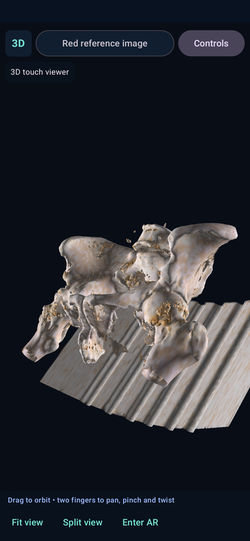
Import a DICOM series folder or supported OBJ/FBX geometry through Android's file picker. Explore volume, slice and surface views, adjust the display, and position, rotate or scale content. DICOM support covers compatible Part 10, uncompressed little-endian, 8-bit or 16-bit monochrome series. Compressed, enhanced, tilted or mixed series are not supported; use one consistent series per folder.
PLACEMENT AND SCALE
Adjust translation in millimetres, rotation in degrees and unitless scale. View source-grid slice dimensions and use saved placements to explore content. These values depend on source units, spacing and transformations. This release has no point-to-point distance, angle or volume measurement tool. Oblique image-grid planes are not guaranteed to match patient anatomical axes.
OPTIONAL AUGMENTED REALITY
On supported devices, place content in the camera view using AR surface tracking, printed reference images and supported QR/fiducial targets. Follow a visible target or lock a placement within the current AR session. Physical marker dimensions must match your printed targets. Tracking can drift, pause or reset and is not anatomical registration.
OFFLINE HELP
The Help centre includes a control reference, import guidance, dimension and placement explanations, a visual walkthrough, privacy information and terms, available without opening a website.
YOUR FILES
Selected files are copied into private app storage for local processing. Removing a content assignment does not erase its imported copy. Clear Android app storage to remove private imports and settings; external originals remain in the location you selected. Use synthetic or properly de-identified imaging and import identifiable information only when lawfully authorized.
DEVICE REQUIREMENTS
Android 14 or later and a compatible 64-bit ARM device. Camera-based AR additionally requires an ARCore-supported device, camera permission and Google Play Services for AR. The non-AR viewer is available separately. Large datasets can exceed device memory. Google ARCore processes service identifiers, diagnostics and activity information as explained in the Privacy Policy.
INTENDED USE
For adult professional, educational and research visualization. This app is not a medical device and does not diagnose, treat, cure, or prevent any medical condition. Consult a qualified healthcare professional for medical advice, diagnosis or treatment. Do not use this release for clinical diagnosis, treatment decisions, surgical navigation, implant positioning or patient registration. No clinical accuracy or regulatory certification is claimed.
Support: info@orthopractis.com
Website: https://www.orthopractis.com
Helvetica Light is an easy-to-read font, with tall and narrow letters, that works well on almost every site.
 |  |  |  |
|---|---|---|---|
 |  |  |  |
 |  |  |  |
 |  |

Use the included original reference-target PDF. Print at 100% / Actual size. Disable Fit to page. Measure the complete square artwork: default width 40 mm, not only the coloured circle or an inner marker. Use the matching Red, Green or Blue reference-image target. If the actual full width differs, enter that measured width in the image-target calibration controls. A calibrated print size is necessary for the geometric pose estimate; it is not clinical registration or accuracy certification.
For reviewer access, host the supplied synthetic-demo ZIP using your chosen public download mechanism. If your Wix Media account supports ZIP documents, upload it there and copy the actual published download URL; otherwise use another publisher-controlled reviewer-accessible location. Test the exact URL while signed out. Add it to the Play reviewer instructions. No public demo URL has been created or invented by this package. The files are mathematical fixtures with no real patient information; do not replace them with identifiable imaging.
Third-party notices
3D Dicom Mobile 1.11.0 uses VTK 9.5.2, ufbx 0.21.3, OpenCV 5.0.0.1, Google ARCore 1.56.0, AndroidX/Compose and Kotlin components. The native runtime libraries and their original attribution files are retained in this project. Historical Meta/Android XR documentation in the source archive does not make this Android phone/tablet release a headset app.
This software is based in part on the work of the Independent JPEG Group.
- [ARCore Additional Terms of Service](https://developers.google.com/ar/develop/terms)
- [Google Privacy Policy](https://policies.google.com/privacy)
The following original license texts are bundled for offline access. They are reproduced without editing. The source project's THIRD_PARTY_NOTICES.md and provenance records describe additional dependency attribution evidence.
OpenCV/COPYRIGHTCopyright (C) 2000-2022, Intel Corporation, all rights reserved.
Copyright (C) 2009-2011, Willow Garage Inc., all rights reserved.
Copyright (C) 2009-2016, NVIDIA Corporation, all rights reserved.
Copyright (C) 2010-2013, Advanced Micro Devices, Inc., all rights reserved.
Copyright (C) 2015-2023, OpenCV Foundation, all rights reserved.
Copyright (C) 2008-2016, Itseez Inc., all rights reserved.
Copyright (C) 2019-2023, Xperience AI, all rights reserved.
Copyright (C) 2019-2022, Shenzhen Institute of Artificial Intelligence and Robotics for Society, all rights reserved.
Copyright (C) 2022-2023, Southern University of Science And Technology, all rights reserved.
Copyright (C) 2023-2025, OpenCV AI, all rights reserved.
Copyright (C) 2024, Bigvision LLC, all rights reserved.
Third party copyrights are property of their respective owners.