
FaceCamoufle
FaceCamouflage transforms a real environment photo into a calculated face-colour plan. Capture the terrain, measure its colours, and project a camouflage pattern onto a live 3D face mesh Capture or import the surrounding environment, calculate direct HEX/RGB field colours, map them onto a live face mesh, and export a painted 3D plan for iOS and Apple Vision workflows.


What FaceCamouflage does
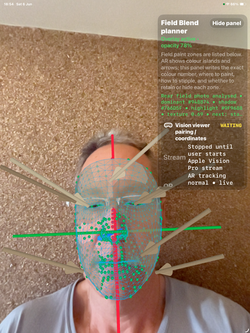
FaceCamouflage is a local field-colour planning app. It captures an environment photo, analyses the visible colours of the background, calculates a camouflage colour plan, projects that plan onto a supported live AR face mesh, and can export a colour table or painted 3D mesh. Apple Vision support allows the user's own nearby Vision device to view the same local colour plan in immersive space.
 |  |  |  |
|---|---|---|---|
 |  |  |  |
 |  |  |  |
 |  |  |  |
 |
FaceCamouflage is an environment-first field-colour planning app for iPhone/iPad and Apple Vision workflows. Capture a photo of the environment around you, let the app extract terrain colours, shadows, highlights, texture and contrast, then review a reversible colour plan mapped to the live front face mesh.
The app creates direct colour targets, not decorative labels. Each plan includes numbered paint areas, vivid colour swatches, ASCII HEX/RGB values, face-area names, vertex IDs, arrows and practical instructions. The FaceCamouflage_PaintedMesh result window shows the calculated colour mesh, while the XLS-style colour table helps users compare or buy paint colours from the exported HEX values.
Exports include a field guide TXT, CSV colour table, Windows-friendly PLY mesh and Apple USDZ mesh. Optional local Vision pairing lets the user inspect the same colour plan in a visionOS immersive space using the same iOS-calculated RGB/HEX values.
FaceCamouflage processes the main workflow locally. It is a visualization and planning tool. It is not a concealment guarantee, emergency tool, safety promise, medical device, identity tool, biometric authentication tool or instruction for unlawful use. Use only skin-safe removable materials and avoid eyes, mucosa, wounds and irritated skin.


FaceCamouflage can be useful because it turns camouflage from a guess into a measured colour-matching workflow. The app does not say “paint your face randomly.” It studies the real environment, extracts the dominant field colours, calculates contrast and shadow balance, maps the result onto the user’s face mesh, and gives practical colour-zone instructions with HEX/RGB values.
Why FaceCamouflage is useful
Face camouflage is difficult because the human face naturally creates recognizable shapes: eyes, nose bridge, cheek highlights, forehead reflection, mouth shadow, jaw outline, and skin-tone contrast. FaceCamouflage is designed to reduce that visual contrast by matching the face surface to the surrounding environment.
The useful idea is:
Take a photo of the environment → measure the colours → calculate a field palette → map those colours to the face → show where each colour should go → export the painted mesh.
It is useful anywhere someone needs to study, design, preview, or document visible-spectrum blending between a human face and a real background.
Fields where it could be useful
1. Outdoor field training and simulation
FaceCamouflage can support field-preparation exercises where users need to understand how colour, shadow, and contrast affect visibility in woodland, desert, rocky, urban, snow, or mixed terrain environments.
It can help answer:
Which colours are actually present here?
Where is the face too bright?
Which areas need darker breakup?
Which colours should be used on forehead, cheeks, nose, jaw, and chin?
It should be presented as a visual planning and training tool, not as a guarantee of invisibility.
2. Military, security, and tactical education
The app can be useful for non-classified, visible-spectrum camouflage education. It helps explain background matching, disruptive coloration, silhouette breakup, and countershading on a 3D face mesh.
Safe positioning:
FaceCamouflage helps users understand environment-based face colour planning for field training, simulation, and documentation.
Avoid promising complete concealment, evasion, combat superiority, or detection-proof results.
3. Hunting, wildlife observation, and outdoor photography
For hunters, birdwatchers, wildlife photographers, and nature observers, the app can help choose face colours that visually harmonize with the immediate environment.
The value is practical:
Do not use generic green/brown. Use the actual green, brown, grey, sand, bark, moss, shadow, and highlight colours from the place where you are standing.
4. Film, theatre, cosplay, and costume design
FaceCamouflage can help makeup artists, costume designers, film crews, and game-reference artists create realistic field camouflage patterns using measured colours from a real location.
This is a strong commercial field because it is creative, visual, and safe:
Use the environment as the colour script. Paint the face to belong to the scene.
5. AR, 3D design, and spatial computing
The app is also useful as a spatial-computing demonstration. It connects iPhone face capture with Apple Vision viewing, exports painted 3D meshes, and shows how colour data can travel from a real photo into a 3D surface.
It can be promoted as:
A field-colour engine for AR face mesh visualization.
6. Colour science and camouflage research
The app can support educational demonstrations of colour measurement, palette extraction, CIELAB-style colour comparison, contrast scoring, entropy, and spatial pattern distribution.
It is useful for showing how camouflage is not only about colour, but also:
contrast, scale, edge breakup, shadow, highlight, and surface geometry.
FaceCamouflage for ios
FaceCamouflage is an environment-first field-colour planning and visualization app for iOS and visionOS. The app is not a decorative colour app and it is not a facial judgement tool. Its central idea is that a face can be treated as a measurable three-dimensional surface that receives a reversible colour plan derived from the actual scene around the user.
The technique begins with a rear environment photo. That image is sampled as the colour reference for the location where the user is standing. The app extracts terrain colours, shadow colours, highlights, local contrast and macro texture frequency from the environment photo. The front TrueDepth/AR face mesh is then used as a geometry canvas. Each face zone is mapped to vertex IDs and assigned a field-colour role: base terrain match, shadow break, light counter-shade, edge disruption, cheek connector, nose bridge suppression or silhouette break.
The philosophy is not to promise invisibility. A face is one of the most recognizable shapes to human vision. The app therefore combines three ideas: background matching, disruptive coloration and countershading. Background matching makes the selected colours approach the captured environment palette. Disruptive coloration breaks recognizable face outlines and feature boundaries. Countershading reduces the visual cue that the face is a rounded object by darkening high-lit regions and lifting shadowed regions. These ideas are consistent with published camouflage literature on background matching, disruption and countershading [R9-R12].


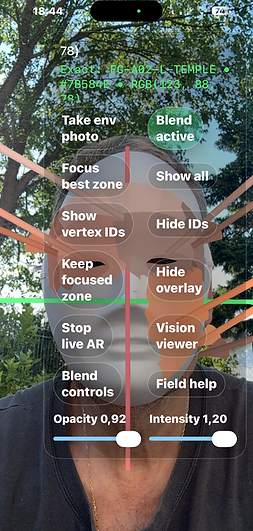


FaceCamouflage is a local field-colour planning and AR visualization app for iPhone/iPad and Apple Vision. Capture the environment, measure the visible colour palette, and create a calculated camouflage colour plan for a supported live AR face mesh.
The app analyses a rear environment photo for terrain colours, shadow, highlight, contrast, and texture. It then builds a colour-zone plan using RGB/HEX values and projects those colours onto a live AR face mesh with fixed vertex IDs. The result can be reviewed as a vivid PaintedMesh popup, colour table, TXT plan, CSV table, PLY mesh, or USDZ mesh.
Apple Vision support lets your own nearby Vision device receive the same local iOS colour plan and view it in immersive space. Pairing begins only after per-launch consent, stays device-to-device, and includes QR fallback for coordinate alignment when needed.
FaceCamouflage is useful for field-colour education, outdoor training visualization, film/costume design, wildlife observation planning, AR/3D demonstrations, and colour-science study. It is not a concealment guarantee, emergency tool, biometric identity product, safety promise, or instruction for unlawful use.
Key features:
- rear environment photo capture;
- environment palette extraction;
- RGB/HEX paint-zone table;
- live AR face mesh visualization on supported devices;
- fixed vertex-ID face-zone mapping;
- vivid PaintedMesh preview;
- blend capability score;
- tiny surface arrows and transparent panels;
- local Apple Vision immersive viewing;
- automatic nearby pairing after consent;
- QR fallback troubleshooting;
- TXT/CSV/PLY/USDZ export;
- privacy-first local workflow.
How the app works
1. Consent first
The app starts with a clear consent and privacy summary. The user must continue before any image, camera, or face-related processing occurs.
2. Environment image
The user imports an environment image through the system Photos picker. This image is used to measure visible field colours such as dominant tones, shadows, highlights, and contrast.
3. Colour calculation
The app processes the image on the device. It builds a camouflage colour plan using the extracted environment palette and creates practical paint-zone guidance with RGB and HEX values.
4. Face mesh preview
The app can show the calculated plan on a local face-zone mesh. This allows the colour table, PaintedMesh preview, blend score, and export files to work on both iPhone and iPad.
5. Optional live face projection on supported iPhones
On a TrueDepth-capable iPhone, the user may manually start live AR face projection after consent. The app then projects the calculated colours onto the live face mesh. This is optional and is not started automatically.
6. iPad safe mode
On iPad models without front AR face tracking, the app remains reviewable and useful. It uses a local template face mesh so the user can still review colours, PaintedMesh, blend score, and exports.
Connectivity explanation
FaceCamouflage does not need an internet connection, Apple Vision connection, Multipeer Connectivity, Local Network permission, Bluetooth pairing, or a cloud account to calculate or export the camouflage plan.
The only “connections” inside the app are local processing steps:
Environment image -> colour extraction -> camouflage plan -> face-zone mesh -> colour table / PaintedMesh / export.
Device capability table
TrueDepth-capable iPhone:
- environment image import
- colour extraction
- local face-zone preview
- optional live AR face projection
- Colour XLS-style table
- PaintedMesh preview
- TXT/CSV/PLY/USDZ export
iPad Air / iPad without front face tracking:
- environment image import
- colour extraction
- local template mesh preview
- Colour XLS-style table
- PaintedMesh preview
- TXT/CSV/PLY/USDZ export
- no required live AR face tracking
Privacy summary
FaceCamouflage processes data locally on the device. It does not collect Face ID templates, create faceprints, identify users, track users, use face data for advertising or analytics, or upload face mesh data to Orthopractis servers. Export files are created only when the user chooses to save them.
FaceCamoufle Vision


Why the Vision companion can be better than using iOS alone
The iOS app is best for capture, environment-photo analysis, front TrueDepth tracking and file export. The Vision companion is better for spatial inspection. It lets the user see the same colour plan in a larger immersive display with a side panel, while the iOS device continues to capture the live face mesh. This separation is helpful because the phone screen can be small, hand movement can interrupt capture, and too much AR text can cover the face. I
Connection requirements
- FaceCamouflage installed on iPhone/iPad.
- FaceCamouflage Vision installed on Apple Vision Pro.
- Both devices nearby.
- Local Network permission allowed when prompted.
- Bluetooth permission allowed when prompted if used for peer discovery.
- Camera permission allowed on iOS for rear environment capture and front TrueDepth face mesh.
- World Sensing permission allowed on Apple Vision Pro for SharedQR marker detection and immersive placement.
- The bundled SharedQR marker available on screen or printed at the intended physical size.
- A supported front TrueDepth-capable iOS/iPadOS device for live face-mesh capture.
 |  |  |  |
|---|---|---|---|
 |  |  |  |

How to connect iOS and Apple Vision Pro
1. Open FaceCamouflage Vision on Apple Vision Pro.
2. Read and accept the Vision consent.
3. Press Start Apple Vision Pro listening.
4. Open immersive space if you want spatial viewing.
5. Open FaceCamouflage on iPhone/iPad.
6. Read and accept the iOS consent.
7. Load an environment photo using the rear camera or Photo Library import.
8. On iOS, press Start Vision viewer stream.
9. Press Pair QR then front.
10. Show the same SharedQR marker to both devices.
11. Wait until iOS shows PAIRED / green when the Vision peer and marker lock are available.
12. iOS returns to the front TrueDepth face mesh.
13. Keep the face in view and press Invent Perfect Blend / Invent blend + arrows.
14. Vision receives the local stream and displays the mesh, colour patches, smaller arrows, vertex IDs if enabled, and Field Blend explanation panel.
15. If the overlay is shifted, use Vision Auto align QR first. If needed, use Physical face lock / fine X/Y/Z/Yaw/Pitch/Roll controls. These controls only correct display placement; they do not change the streamed face geometry or colour plan.

dowload image and print in 12 cm x 12 cm this should visible both ios device during pairing once and from applevision and ios device a green recognition panel once the paired image is seen

Connection requirements
- FaceCamouflage installed on iPhone/iPad.
- FaceCamouflage Vision installed on Apple Vision Pro.
- Both devices nearby.
- Local Network permission allowed when prompted.
- Bluetooth permission allowed when prompted if used for peer discovery.
- Camera permission allowed on iOS for rear environment capture, rear SharedQR recognition and front TrueDepth face mesh.
- World Sensing permission allowed on Apple Vision Pro for SharedQR marker detection and immersive placement.
- The bundled SharedQR marker available on screen or printed at the intended physical size.
- A supported front TrueDepth-capable iOS/iPadOS device for live face-mesh capture.
How QR pairing is done, step by step
1. Open FaceCamouflage Vision on Apple Vision Pro.
2. Read and accept the Vision consent.
3. Press Start Apple Vision Pro listening.
4. Open immersive space if you want spatial viewing.
5. Open FaceCamouflage on iPhone/iPad.
6. Read and accept the iOS consent.
7. Load an environment photo using the rear camera or Photo Library import.
8. On iOS, press Start Vision viewer stream if you only need local streaming.
9. For shared coordinates, press Pair QR then front on iOS.
10. As soon as Pair QR then front is pressed, the iOS control/help panel slides away. This is intentional. It gives the rear World/QR camera a clean view of the SharedQR marker.
11. Hold the SharedQR marker flat, still and well lit. Both devices should see the same marker if possible.
12. When iOS recognizes SharedQR, the iOS AR view draws a translucent green marker plane directly over the QR image. RGB axes appear from the marker plane so the user can see the shared coordinate frame.
13. If the Vision app is listening and receives the marker-space stream, the Vision status changes toward green. In immersive view, Vision can show a green marker frame/lock indicator or green pairing status showing that the shared QR coordinate frame is usable.
14. When iOS shows PAIRED / green, the marker lock and Vision peer connection are both available.
15. iOS automatically returns from the rear World/QR camera to the front TrueDepth face mesh.
16. Keep the face in view. The iOS app streams marker-space face mesh coordinates, triangle indices, vertex IDs, selected metrics, Field Blend colour patches, arrow state, opacity/intensity and retain/hide state to Vision.
17. Vision places the streamed mesh and colour plan in the shared marker-space frame. If the overlay is shifted because the rear QR camera session and front TrueDepth face session do not perfectly overlap, press Auto align QR first, then use Physical face lock and fine X/Y/Z/Yaw controls.
18. To restore iOS text controls after QR recognition, double-tap the iOS screen or press Field Blend panel.
What appears on the screen after SharedQR is recognized
On iOS:
- the help/control panel disappears during scanning;
- the rear camera view stays visible;
- a translucent green plane appears over the recognized SharedQR marker;
- red/green/blue axes show the marker coordinate directions;
- the status moves from WAITING/yellow to QR recognized or PAIRED/green;
- after successful pairing, iOS returns to front TrueDepth face capture.
On Apple Vision Pro:
- Start listening opens the local receiver;
- immersive space can show a green marker frame or green lock/status when the marker-space reference is usable;
- the streamed face mesh, transparent camouflage colour patches, smaller arrows and optional vertex IDs appear in the shared coordinate context;
- the panel is transparent so the real room and overlay remain visible;
- Auto align QR and Physical face lock can correct display placement without changing the iOS colour plan.


What the status lamps mean
- WAITING / yellow: Vision is not receiving a current frame, QR is not locked, or the stream is not connected.
- STREAMING: Vision has received a current iOS frame.
- PAIRED / green: iOS marker lock and Vision peer connection are both available.
- Not connected: the peer connection is missing or was interrupted. Start listening on Vision, start streaming on iOS, approve Local Network/Bluetooth prompts and pair again.
Common troubleshooting
1. Vision does not connect
- Open FaceCamouflage Vision first.
- Press Start Apple Vision Pro listening.
- On iOS press Start Vision viewer stream.
- Keep both devices nearby and on the same local network when possible.
- Check Local Network and Bluetooth permissions.
2. QR marker does not lock
- Use the bundled SharedQR marker.
- Keep the marker flat, visible and well lit.
- Avoid glare and motion blur.
- Let both devices see the same marker before returning to the front face mesh.
3. Overlay is shifted in Vision
- Press Auto align QR.
- Use Physical face lock.
- Adjust X/Y/Z and rotation only enough to place the streamed mesh over the real face.
- Do not change the colour plan just to fix alignment; alignment controls affect placement only.
4. Arrows are too visible or not wanted
- Press the arrow button.
- Green “Arrows active” means the smaller arrows are visible.
- Grey “Arrows inactive” means arrows are hidden.
- Colour patches, vertex IDs, Field Blend rows and exports continue to work.
5. Console messages appear
The following Apple framework messages can appear during networking, camera or rendering transitions and do not automatically mean a privacy issue or app failure:
- TCP_INFO not supported on socket;
- FigAudioSession err=-19224;
- fence tx observer timed out;
- Not in connected state, giving up for participant/channel.
If Vision is not connected, start listening on Vision and start the iOS stream again.
Privacy and local processing
FaceCamouflage does not require an Orthopractis account for the core workflow. It does not use advertising SDKs, tracking, third-party profiling, third-party AI training, biometric identity verification or a server-side face database. The iOS and Vision pairing workflow is local device-to-device communication between the user’s own nearby devices. Exports happen only when the user presses export/share.
Support contact
For support or privacy questions: info@orthopractis.com
Privacy page: https://www.orthopractis.com/privacy
Terms page: https://www.orthopractis.com/terms-of-use
Product page: https://www.orthopractis.com/FaceCamouflage
 |  |  |  |
|---|---|---|---|
 |  |  |  |
 |  |  |
Numbered references
[R1] Apple Developer Documentation, ARFaceGeometry vertices. ARFaceGeometry exposes a buffer of vertex positions for each point in the face mesh; vertexCount gives the element count and triangleIndices describe the triangle mesh. URL: https://developer.apple.com/documentation/arkit/arfacegeometry/vertices-fhdb
[R2] Apple Developer Documentation, RealityKit. RealityKit provides high-performance 3D simulation and rendering for apps with 3D or AR content on Apple platforms, including visionOS. URL: https://developer.apple.com/documentation/realitykit
[R3] Apple Developer Documentation, Creating fully immersive experiences in visionOS apps. Fully immersive experiences combine custom content with RealityKit or Metal and replace what the person sees with app-provided content. URL: https://developer.apple.com/documentation/visionos/creating-fully-immersive-experiences/
[R4] Apple Developer Documentation, Multipeer Connectivity. Multipeer Connectivity supports discovery of nearby devices and message/file/resource communication over local Apple transports; apps using the local network need NSLocalNetworkUsageDescription. URL: https://developer.apple.com/documentation/multipeerconnectivity/
[R5] Apple Developer, App privacy details on the App Store. Apple requires developers to provide privacy-practice information in App Store Connect for new apps and updates, including third-party partners; on-device processing that is not transmitted off-device is not considered collected. URL: https://developer.apple.com/app-store/app-privacy-details/
[R6] Apple Developer Help, App Store Connect app privacy. Privacy Policy URL is a required, publicly accessible URL in App Store Connect app privacy metadata. URL: https://developer.apple.com/help/app-store-connect/reference/app-information/app-privacy/
[R7] CIE, Colorimetry Part 4: CIE 1976 L*a*b* colour space. CIELAB was recommended to make colour distances more approximately perceptual than XYZ or chromaticity diagrams. URL: https://cie.co.at/publications/colorimetry-part-4-cie-1976-lab-colour-space-0
[R8] Sharma, Wu and Dalal, The CIEDE2000 color-difference formula. Implementation notes and test data for CIEDE2000 color-difference calculations, Color Research & Application 30(1), 21-30. URL: https://onlinelibrary.wiley.com/doi/10.1002/col.20070
[R9] Cuthill et al., Disruptive coloration and background pattern matching. Nature 434, 72-74 (2005): distinguishes background pattern matching from disruptive coloration at an object's periphery. URL: https://www.nature.com/articles/nature03312
[R10] Stevens and Merilaita / Royal Society, Defining disruptive coloration and distinguishing its functions. Disruptive coloration can break up object appearance and outlines; countershading/self-shadow concealment can reduce shape-from-shading cues. URL: https://pmc.ncbi.nlm.nih.gov/articles/PMC2674077/
[R11] Penacchio et al., Is countershading camouflage robust to lighting change due to weather?. Countershading is a pattern in which surfaces facing the light are darker and surfaces facing away are lighter to make reflected light more uniform. URL: https://pmc.ncbi.nlm.nih.gov/articles/PMC5830711/
[R12] Tankus and Yeshurun, Computer vision, camouflage breaking and countershading. Camouflage often masks familiar contours and texture by superimposing multiple edges; the paper studies 3D convex object detection and countershading. URL: https://pmc.ncbi.nlm.nih.gov/articles/PMC2674074/
[R13] Wang, Bovik, Sheikh and Simoncelli, Image quality assessment: from error visibility to structural similarity. SSIM compares luminance, contrast and structural similarity rather than raw pixel error alone. URL: https://pubmed.ncbi.nlm.nih.gov/15376593/
[R14] Otsu, A threshold selection method from gray-level histograms. Classic histogram thresholding method for separating classes by between-class variance. URL: https://doi.org/10.1109/TSMC.1979.4310076
for ios for apple vision